Prepare for your CMMC assessment using Senserva Federal. Deep Microsoft 365 security evidence in an easy to use tool.
You know the 110 practices in NIST SP 800-171. The hard part is knowing which Microsoft 365, Entra ID, Intune and Defender settings provide the evidence for each one. Senserva gathers that evidence for you.
Senserva helps you prepare for your CMMC Level 2 assessment. Setup takes minutes, with no software agents to deploy. Senserva reads your Microsoft environment, ties every setting to the practice it supports as dated evidence, explains each result in plain language, and guides you through every fix with step-by-step remediation. Senserva Trustworthy AI answers your questions about the evidence in plain language and drafts each fix for your review.
Want our live experts working alongside you? We are available: Senserva Assist.
One of our Microsoft 365 cybersecurity team members will reply from senserva.com to set up the 30 minutes.
See how Senserva turns Microsoft 365 into CMMC evidence.
Your assessor will ask for Microsoft 365 proof. Have it ready.
You know the assessor wants dated evidence that each practice is in place and working. For the practices that live in Microsoft 365, Senserva's CMMC report gives you that evidence, in terms you can explain and defend.
 The reportGrades every practice and shows the evidence behind each result, with the date it was checked.
 Remediation toolsGive your team the script or steps for each gap. A rescan confirms the fix with a new date.
 Drift monitoringKeeps watching after your assessment. If a setting changes, you hear about it before your assessor does.
You walk your assessor through the list instead of defending a spreadsheet you built by hand.
Find it. Evidence for every practice, straight from your Microsoft settings.
Senserva reads Microsoft 365, Entra ID, Intune, Azure Defender and your endpoints, and grades every NIST SP 800-171 practice: Pass, Fail or Manual Attestation Required. Findings are dated and ranked by severity, with actively exploited vulnerabilities at the top, so your team fixes the biggest risks first. Each result names the Microsoft setting behind it, so you can see exactly why a practice passed or failed.
Practices outside your tenant
A Microsoft scan can only prove what lives in Microsoft. Physical security, personnel screening, training and written policies happen outside your tenant, so they stay with your manual attestation process. Senserva keeps them clearly separate from what it can prove.
How Senserva helps
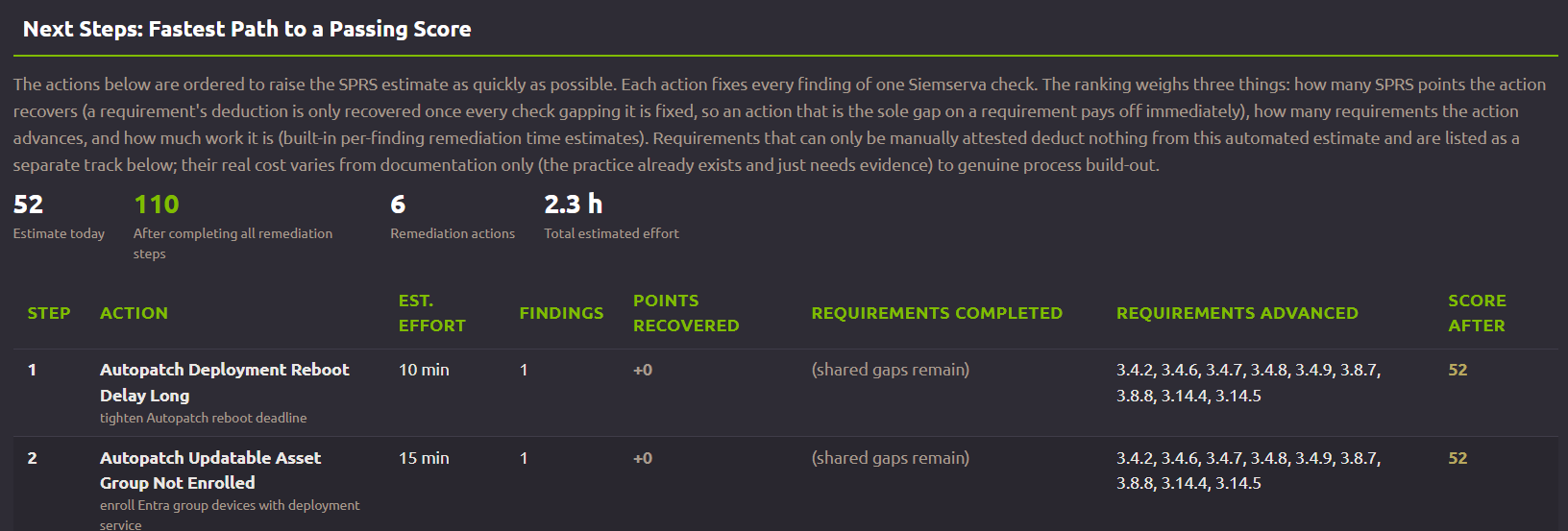
Fix it. The fastest path to a higher readiness score.
A requirement's points return only once every missing requirement is fixed. Next Steps ranks the required fixes as a set to work together to gain the points. In this example, six actions and about 2.3 hours are required to take the SPRS estimate from 52 to 110.
Easy to work through: Senserva Trustworthy AI drafts each fix for your tenant and validates it before your team sees it. Nothing changes until you approve.
Every finding ships with the script or steps to remediate it, making the fix easy for your team to implement. A rescan then adds new dated evidence that the fix held.
Prove it. A readiness score backed by evidence.
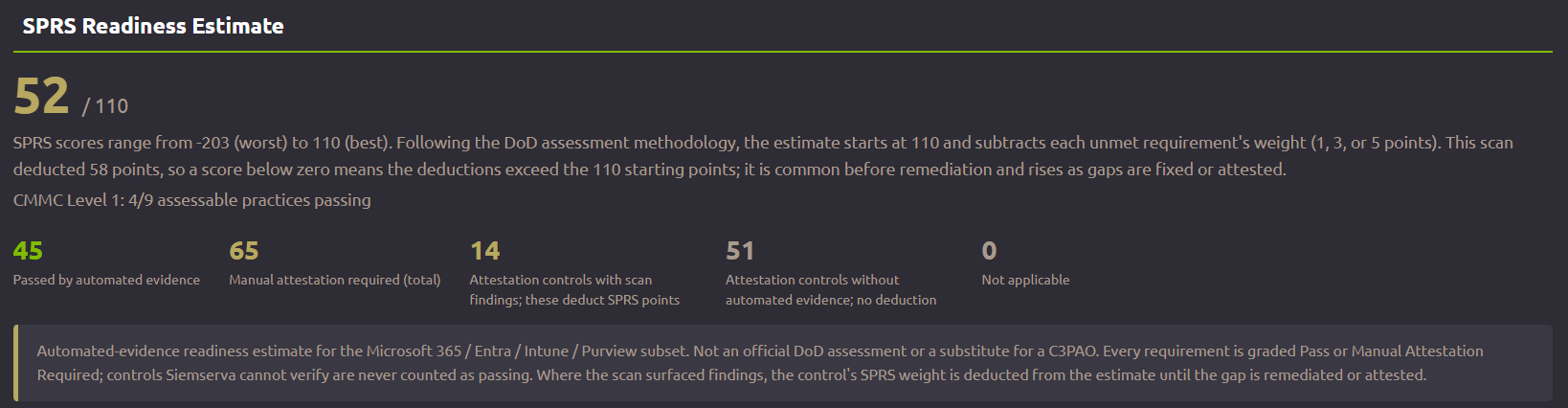
Results are tallied as an SPRS readiness estimate. In this example it reads 52 of 110: 45 controls passed with evidence from the automated scan and 65 controls require manual attestation, with 14 of them partly supported by automated findings.
No points are assigned or deducted for manual-attestation controls, and anything Senserva cannot verify is never counted as passing or failing.
The same audit also maps your tenant to CISA SCuBA and ScubaGear and the Microsoft Cloud Security Benchmark. See every framework →
Stay ready. Your score can slip the day after your assessment. Senserva catches it first.
You know about the annual affirmation. The risk is inside Microsoft 365 itself: settings change, admins make exceptions and new vulnerabilities get exploited every week. Senserva keeps scanning between assessments and flags the Microsoft changes that affect your readiness, so the affirmation is backed by current evidence.
Senserva Assist.
A Microsoft 365 cybersecurity expert, working alongside your team.
Senserva Assist is our services offering. One of our Microsoft 365 security team members helps you turn your Microsoft 365 results into evidence for your Level 2 assessment, plan what to fix first, and work through remediation with you.

 Get going: your first results and planWe walk your first audit with you, explain which findings matter most, and plan what to fix first.RemediationWe work the fixes with you, from ready-to-run scripts to step-by-step changes.Getting ready for your assessorWe show which Microsoft 365 settings and evidence support each practice, so you can walk your assessor through them with confidence.
Senserva Federal Pricing
Senserva for CMMC, for teams that need Level 2 readiness evidence. Every practice included.
GCC High: coming soon.
Want our Microsoft 365 cybersecurity experts alongside you? Add Senserva Assist. See all Senserva pricing →
Federal Watch: free email alerts on federal deadlines.
A free email from Senserva that tells you when federal security deadlines and rules change for Microsoft environments. We check CISA, NIST NVD, the Federal Register, acquisition.gov and Microsoft twice a day.
Just the deadlines, no sales pitches.
See where your environment actually stands.
Download the Senserva demo and run three free audits on your own tenant. Registration is all it takes, and you can see your first findings in about 20 minutes. Questions about your Level 2 scope? Talk to our engineers.
Senserva is not an official DoD assessment or a substitute for a C3PAO, and holds no FedRAMP authorization or agency endorsement. We produce evidence; a certified assessor decides compliance. Screenshots are labeled demonstrations on fictional tenants, never a customer.