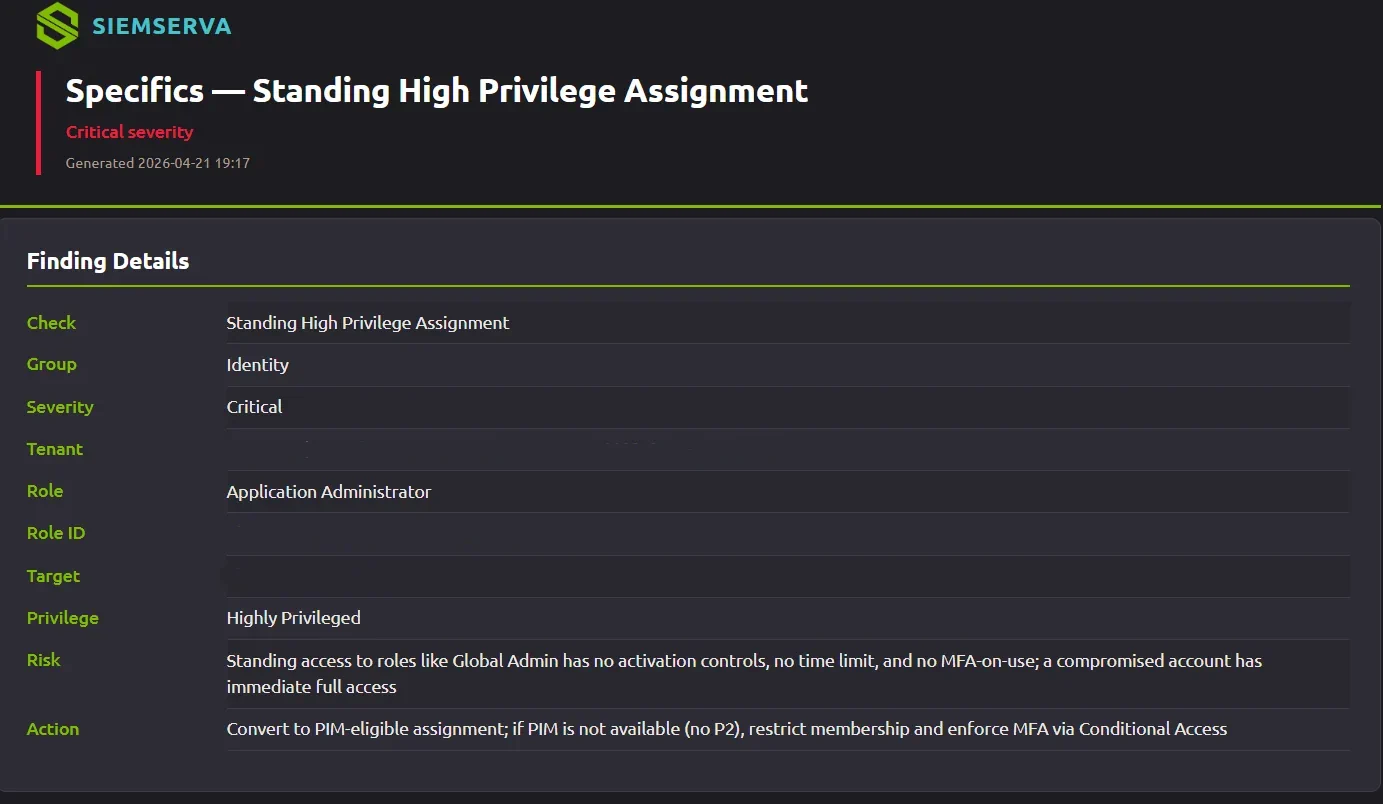
One finding, with the evidence and a ready-to-run remediation.
Drift management is the ongoing practice of detecting when a system has drifted from its intended secure baseline and bringing it back. In security, security drift (also called configuration drift) is the slow divergence of live settings from that baseline. The discipline goes by several names, configuration management, configuration governance, and infrastructure drift management among them, but the goal is the same: know your baseline, detect changes in near real time, and close the gap. For Microsoft 365 that spans identity, devices, applications, and Azure and Entra role assignments.
What is configuration drift?
Configuration drift is the slow, unplanned divergence of your live settings from the secure baseline you intended. In a Microsoft 365 tenant it shows up as security drift: small changes that each seem harmless but together open real gaps.
Common examples of security and configuration drift:
- A Conditional Access exclusion added "temporarily" for one user, and never removed.
- MFA quietly disabled for a service account or a break-glass login.
- A SharePoint or Teams sharing setting loosened to fix one problem.
- An admin role left standing instead of made eligible through PIM.
- An Azure or Entra role assignment granted for a project and never revoked, role assignment drift that quietly widens privileged access.
- A Microsoft service update that changes a default after your last review.
Every one of those is drift, and every one is a gap an attacker or an auditor can find.
Watch: the new patch management crisis
See all Senserva videos.
Why tenants drift
Drift is not a one-time mistake, it is the natural state of a busy environment. Multiple admins make daily changes. Exceptions get granted under pressure and outlive their reason. Microsoft ships changes that move defaults. And an MSP managing dozens of client tenants multiplies all of it. Without continuous drift management, the gap between "configured securely" and "actually configured" only widens.
How to audit configuration changes and detect drift from a baseline
Effective drift management, whether you call it configuration governance, infrastructure drift management, or enterprise drift management, comes down to four repeatable steps. Good drift management tools automate all four.
- Set the baseline. Define the secure configuration you intend, mapped to a recognized standard such as the Microsoft cloud security benchmark or CISA SCuBA.
- Detect changes continuously. Compare the live tenant against the baseline on an ongoing basis, close to real time, rather than once a quarter, so you catch configuration changes as they happen.
- Rank what matters. Not every change is a risk. Prioritize the drift that weakens security or breaks a control, including privileged role assignment drift.
- Close the loop. Remediate, with a reviewed fix or through your existing ticketing, and confirm the next check shows the gap closed.
This is also how you prevent Azure role assignment drift specifically: baseline the approved role assignments, detect any new or standing assignment that diverges, and revoke or justify it.
Two ways Senserva handles drift management
Whether you want to find and fix drift in your own tenant today, or manage it continuously across many tenants, Senserva has an answer.
| Senserva | Senserva Drift Manager | |
|---|---|---|
| Best for | IT and security teams who want to find and close drift now | MSPs, MSSPs, SOCs, and enterprises managing drift across many tenants |
| How it runs | On-premises scanner on Windows or Mac, your data stays with you | Azure-hosted, cloud database, rules-based, continuous |
| What it does | Scans against a secure baseline, ranks the drift, and helps you fix it with validated remediation | Continuously detects drift and surfaces it for action |
| Remediation | Find and fix, with reviewed, ready-to-run remediation | Facilitates remediation through your existing processes and ticketing (ServiceNow, ConnectWise, and more) |
| Scope | Microsoft 365, Intune, Defender, Entra ID (logs included), CVEs, and Purview | Configuration drift across your managed environment |
Senserva finds and fixes drift in a tenant on demand. See Senserva. Senserva Drift Manager detects drift continuously and works with the ticketing and remediation workflows you already run. See Senserva Drift Manager.
Drift, security, and compliance
Drift is how a tenant that passed its audit last quarter quietly falls out of compliance this quarter. A single point-in-time review cannot catch it, because the drift happens after the review. Continuous drift management keeps you on baseline and audit-ready between assessments, with the evidence to prove it.
The sensing half of this loop has its own page: drift detection, catching each change the day it happens. And the damage half has one too: security drift, the drift that weakens your defenses.
That includes CIS Benchmark drift: continuously monitor Microsoft 365, Entra ID, and your Intune-managed devices, including Azure Virtual Desktop (AVD) session hosts managed through Intune, against CIS-aligned baselines, so benchmark drift is caught the day it happens instead of at the next audit.
Compliance and frameworks | Compliance requirements guide | SCuBA and MCSB baselines
Drift in IaC environments and across MSP tenants
Two situations make drift especially painful, and both are squarely in scope.
More on configuration and security drift
From the Senserva blog:
Frequently asked questions
Configuration drift is the gradual, unplanned divergence of your live settings from the secure baseline you intended. In Microsoft 365 it appears as security drift: small configuration changes that accumulate into real security and compliance gaps.
Security drift is configuration drift that weakens your security posture, for example an MFA requirement removed, a Conditional Access exclusion left in place, or a sharing control loosened. It is the most consequential kind of drift in an identity and collaboration platform like Microsoft 365.
Configuration drift management is the ongoing practice of detecting drift from a secure baseline and closing it, rather than checking once and hoping nothing changes. It combines a known-good baseline, continuous detection, and a remediation path.
A one-time audit is a snapshot. Drift happens after the snapshot, so a tenant can pass an audit and be out of baseline weeks later. Drift management is continuous, catching the changes a single review never sees.
Both, depending on the product. Senserva finds drift and helps you fix it with reviewed, ready-to-run remediation. Senserva Drift Manager detects drift continuously and facilitates remediation through your existing processes and ticketing systems.
Senserva Drift Manager is an Azure-hosted, rules-based configuration drift detection product for MSPs, MSSPs, SOCs, and enterprises. It detects drift across your managed environment and works with the ticketing and remediation workflows you already run, such as ServiceNow and ConnectWise.
Compliance is a moving target because tenants drift after they are assessed. Continuous drift management keeps you on baseline between audits and gives you the evidence to show you stayed there.
IaC tools declare your intended state but do not see changes made outside the pipeline, and many Microsoft 365 settings are not managed by IaC at all. You still need drift detection to catch the divergence, which is why drift management is described as the complement to Infrastructure as Code.
By standardizing a baseline and monitoring every client tenant for divergence continuously, rather than spot-checking. Senserva detects Intune configuration drift, compliance policies, configuration profiles, and update rings, per tenant, and surfaces it for action so it does not pile up across every tenant.
Drift management means continuously detecting when a system has drifted from its intended secure baseline and bringing it back into line. In Microsoft 365 it covers identity, devices, applications, and role assignments.
Drift management tools baseline your intended configuration, detect divergence from it continuously, rank the changes that matter, and help you remediate. Senserva provides this for Microsoft 365 with Senserva and, across every tenant, Senserva Drift Manager.
Baseline the approved Azure and Entra role assignments, detect any new or standing assignment that diverges from that baseline, and revoke or justify it. Continuous detection is what keeps privileged access from drifting wider over time.
Set a CIS-aligned baseline for Microsoft 365, Entra ID, and your Intune-managed devices, including Azure Virtual Desktop session hosts managed through Intune, then compare the live configuration against it continuously. Senserva flags benchmark drift as it happens and ranks the changes that matter.
Detection paired with an always-on fix path. Every detected drift is routed to a reviewed remediation or into your existing ticketing (ServiceNow, ConnectWise, and more), so the gap closes when it appears, not at the next quarterly review.
Helpful links
References on secure baselines, benchmarks, and drift for Microsoft 365, Intune, Defender, and Entra ID. Each opens in a new tab.
- Microsoft cloud security benchmark: microsoft's baseline of security controls to measure drift against
- CIS Benchmarks: consensus-based secure configuration baselines from CIS
- CISA SCuBA: cISA's Secure Cloud Business Applications baselines for Microsoft 365
- Entra ID Conditional Access: the access policies most prone to security drift
- Defender for Cloud regulatory compliance: tracking configuration against regulatory standards in Azure