Agentic Patch Management

Coming Soon
Patent Pending

Built by a team led by Mark Shavlik

A former member of the Microsoft Windows NT Kernel team, Mark created HFNetChk and MBSA for Microsoft, and his team built the SMS 2.0 SUS Feature Pack. Mark and his team developed core patch management technologies that were later used in Windows Server Update Services (WSUS). He founded Shavlik Technologies, one of the industry's leading patch management companies, and sold it to VMware; the patch model he designed is still in use in many major patching products.

Too many patches are still applied by hand, while AI-driven attacks move faster than any manual process. Senserva's goal: make patching faster, easier and much more reliable.

Senserva 360 Patch+ finds what your machine is missing, patches it, removes what you do not want and fixes basic security settings, with a click. Free on this machine. From the team that built Microsoft's first patch scanners, HFNetChk and MBSA, now rebuilt with AI agents for Windows, macOS and Linux. AI-enhanced, not AI-dependent: every scan and install works without AI; the agents make it better.

Using Senserva today? See AI Patch Management in Siemserva, on the Microsoft Security Store. Building patching into a product? See the OEM program.

Senserva 360 Patch+: scan, Patch It, Remove It, Fix It

One app for the machine in front of you. Scan it, see what is missing worst first, then act on what you choose.

Scan

Scan this machine and see every missing Microsoft and third-party update, with exploited vulnerabilities first. The same scan checks basic Windows security settings, such as SMBv1, UAC, LSA protection, the firewall and PowerShell 2.0.

Patch It

Install the missing app updates with Senserva's verified installers, after one administrator prompt. It first checks why updates fail on this machine, and it never restarts on its own. A rescan proves the result. It installs third-party app updates on Windows; Microsoft's own updates stay with Windows Update.

Remove It

Remove software you no longer want. You pick what goes.

Fix It

Fix a basic security finding with a click, then the check runs again to confirm the fix.

Free on this machine

Scanning the machine Patch+ runs on is free, and so are Patch It, Remove It and Fix It on that machine. Patch data checks need registration.

Security configuration management

Missing patches are half the picture. Patch+ checks the basic security settings on the machine it runs on, in the same scan as patches, and Fix It corrects a finding with a click.

Windows settings
Basic security settings, such as SMBv1, UAC, LSA protection, the firewall and PowerShell 2.0, checked in the same scan as patches.
Linux settings
Checks such as root SSH sign-in, SSH password sign-in and ASLR.
Fix It
Click to fix a finding, then the check runs again to confirm the fix.

Restarts and deadlines on your terms

Patching should fit around your work and around the rules your organization already set.

A restart that asks first

When an update needs a restart, Patch+ asks before it restarts: restart now, tonight, or delay an hour, up to three times.

Works with your deadlines

When Intune, Group Policy or Configuration Manager manages restarts, Patch+ leaves them to it, and shows the deadline and where it came from.

Problem patches flagged

A patch with a Microsoft known issue or a Senserva Watch breakage alert is marked Warning in the report, with Microsoft's status and fix. With Patch It, such a patch is held from installing until you override it by name.

Windows, macOS and Linux

Patch+ scans and reports what is missing on every platform, and it installs products that have passed the install lab.

Windows

Windows 10 and 11, Windows Server 2012 R2 to 2025, .NET, Edge, Microsoft 365 Apps, Teams and SQL Server, plus third-party apps such as Chrome, Firefox, Acrobat Reader, Zoom, VS Code, 7-Zip, Notepad++, Java and VLC. Patch+ is one Native AOT file, and it can also scan your network or your domain, with nothing to install on the machines it scans.

macOS

A native Mac app that scans the Mac it runs on against Apple's macOS, Safari and Xcode releases and the Mac builds of apps such as Chrome and Firefox.

Linux

Local scans read the installed packages directly and are proven on Ubuntu, Debian, Red Hat, Fedora and Alpine. The p25 command-line scanner runs on Windows, Linux and macOS, with JSON output for scripts.

Linux: Debian, Ubuntu, Fedora, Red Hat Enterprise Linux (UBI) and Alpine, through each distribution's own package manager (apt, dnf, apk).

Linux packages

p25 as .deb, .rpm and .apk packages, with a scheduled scan.

Features and data coverage may change.

Live data feeds that get the right patches

The right patch depends on the right data. Senserva's patch repository is rebuilt every day from vendor and threat sources, so a scan is checked against what vendors shipped this week, not last quarter.

80+
vendor and threat sources tracked
3,300+
products in the repository
91,000+
patches, rebuilt daily
Microsoft
The MSRC security update API, Windows 10, 11 and Server cumulative updates, the Microsoft Update Catalog for supersedence, the WSUS offline catalog with Windows Update's own installed checks, .NET, Edge, Microsoft 365 Apps and SQL Server updates.
Third-party vendors
Feeds for the software admins actually run: Chrome, Firefox, Zoom, Slack, Java, Adobe Acrobat and Reader, 7-Zip, Notepad++, Git, VS Code, Citrix Workspace, TeamViewer, VLC and many more, with NVIDIA advisories for hardware.
Linux distributions
Ubuntu security notices, the Debian security tracker, Red Hat and SUSE advisories, Alpine and Fedora updates.
macOS and Mac apps
Apple's macOS, Safari and Xcode releases and Apple's own apps, plus the Mac builds of Chrome, Firefox, Zoom, Slack, Microsoft Teams, Office and more.
Exploitation and risk
CISA's Known Exploited Vulnerabilities catalog, FIRST EPSS exploit likelihood, NVD, CISA vulnrichment, GitHub and OSV advisories, and public exploit availability from Exploit-DB.
Known issues
Microsoft's known issues for each update, quoted and linked, so a problem patch is visible before it is installed.

Counts from the Senserva patch repository, 25 October 2026. The patch data is Senserva's: access requires registration, and free use runs against hosted data. It is not open source and not offered as a download.

The agents: what makes it agentic

Each agent has one job, a narrow set of tools, and a person who approves what it proposes. Nothing reaches your machines until it has been tested and you have said yes.

Agentic installs, in order

1. Learn: the install lab

A product specialist agent per product learns how that product installs on clean, disposable lab machines before it is trusted. Chrome, Firefox, Acrobat Reader, VS Code, 7-Zip, Notepad++ and KeePass have passed the lab as the system account on Windows Server 2022.

2. Verify

The installer must be signed by that product's pinned publisher and pass a malware scan.

3. You approve, and patches wait

A person consents before anything installs: each one, or once by opting into scheduled patching. A patch with a threat or the wrong publisher is held for every machine until someone looks, and patches roll out in rings: a test group first, then wider.

4. When an install fails at your site

The agent steps in: it picks one fix from a fixed list of safe actions (retry machine-wide, close the app and retry, use the other verified installer, or stop and report), your machine checks the choice against your policy, and every step is logged. It never runs a command it made up.

Agents that keep the data right

The repair loop

When a vendor source fails, an agent proposes the missing releases from the vendor's own pages after the daily build. Code re-verifies every proposal, and one reaches the patch data only after it verifies on three separate days.

The Lookout

A watch service over every place the repository reads. It spots new items as vendors publish them, and the silent changes too: a vendor page that changed shape while the data still looked fine. The AI proposes; code never deploys itself.

Supersedence, per product line

Which update replaces which is how you install only what is needed. Each product line, Firefox ESR beside Firefox or a Java release line beside the next, gets its own model, and a Supersedence agent per product proposes and cross-checks. For Microsoft, supersedence stays deterministic.
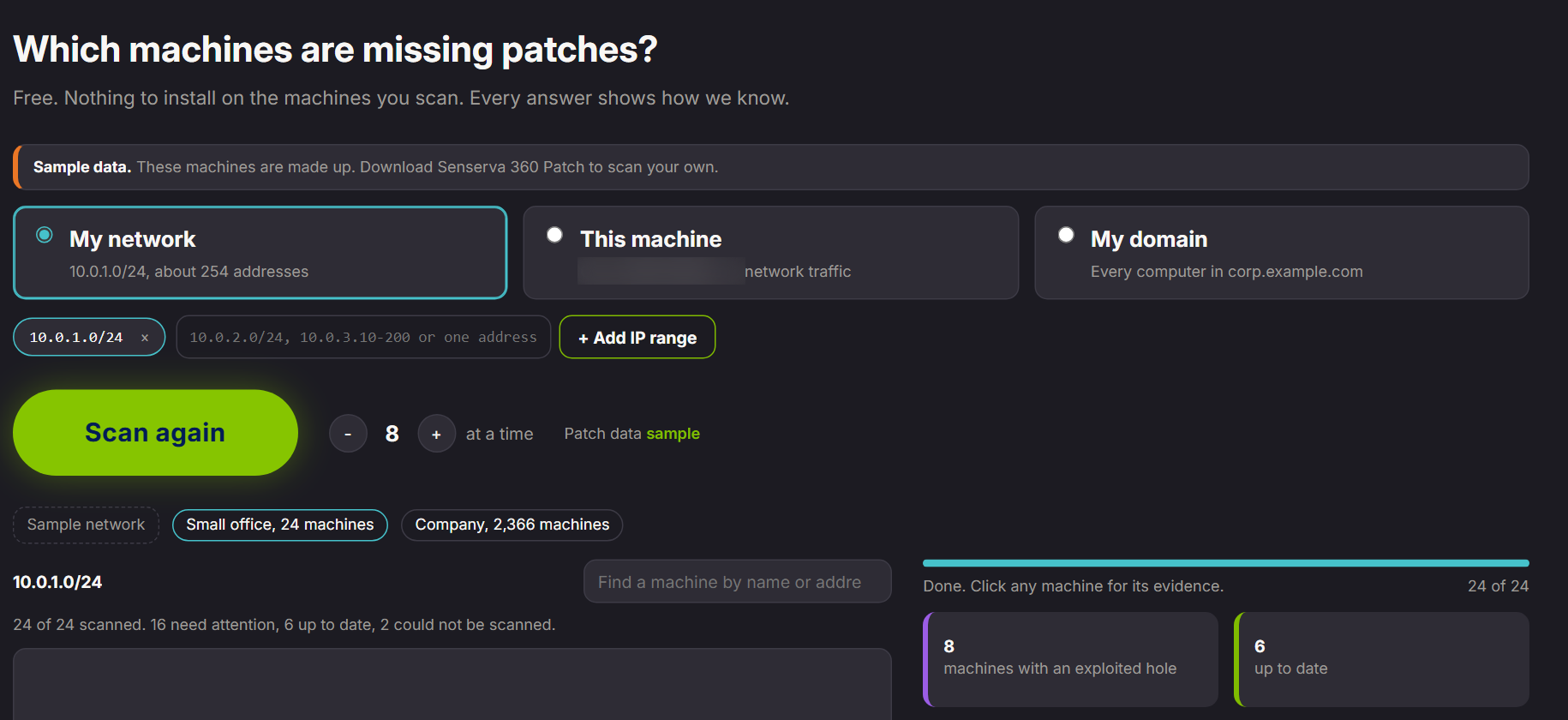
The Senserva scanner: choose a network, this machine or a domain, then scan; sample data showing 24 machines scanned, 8 with an exploited hole
The scanner sweeps a network, one machine or a domain and ranks machines worst first. Sample data.
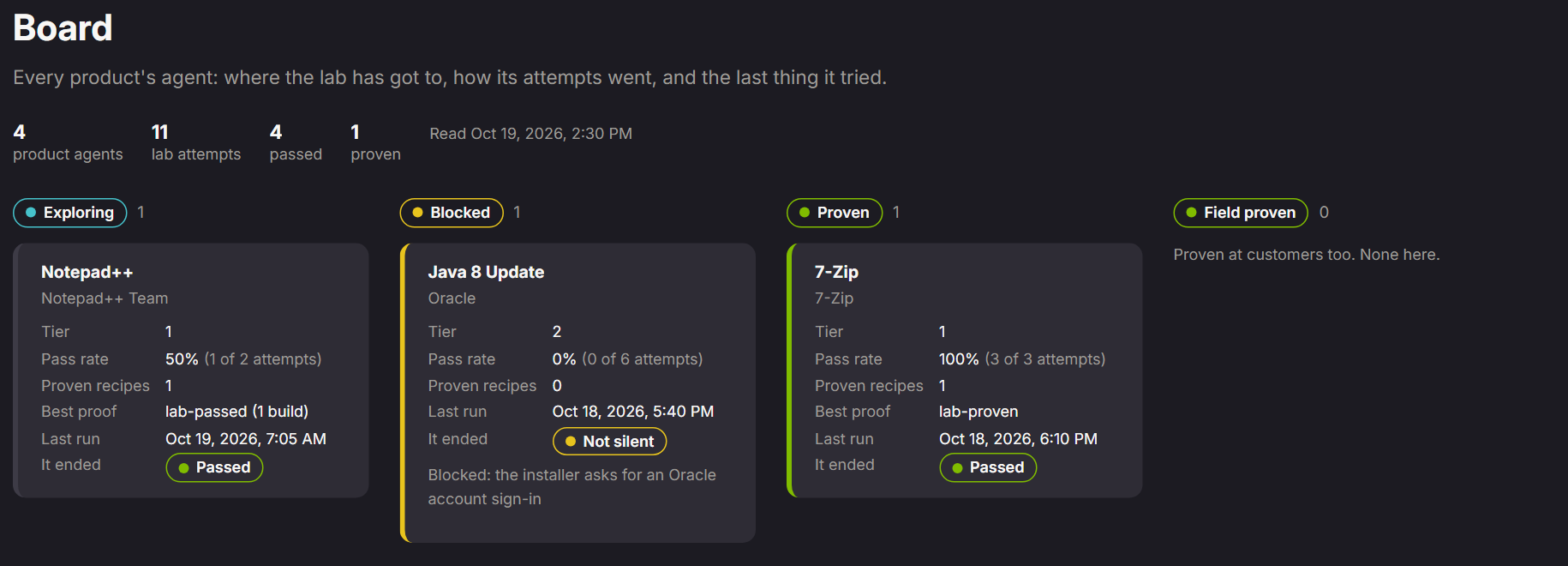
The install lab board: each product's agent, its lab attempts, pass rate and best proof
The install lab board: each product's agent, its attempts on lab machines, and its proof.

MSPs are supported

Managed service providers patching for many customers use the same platform.

One set of code
The instance an MSP runs is the same one Senserva runs for its own users.
Customers' data stays with you
Findings, names and reports stay in your tenant.
Enrol machines
One-time install codes, and an instance limited to the customer tenants you choose.
Per-tenant install
A scripted install of your own instance for each customer tenant.

The patch community, on app.senserva.com

Sign in at app.senserva.com for Patch Management and the Patch community: the Patching Group, where admins compare how each update went, what broke and what fixed it, alongside the Microsoft 365 Security Group. A moderator reads every post before others see it, and posts carry a nickname, never your address.

What is free

Patch+ on this machine
Scanning the machine Senserva 360 Patch+ runs on, and Patch It, Remove It and Fix It on that machine as they ship. The p25 command-line scanner finds what each of your machines is missing.
Hosted patch data, with registration
Free scans check against Senserva's hosted patch data. Registration is required, and the data stays hosted: there is no download.
The community
Read and post in the Patching Group and the Microsoft 365 Security Group once you have access and confirm your email address.

Pricing

Patch+ on the machine in front of you is free. Pro and Enterprise are priced per device, and MSPs pay a monthly platform fee plus a per-device rate across all of their customers.

Community

Free
on this machine

For one person patching the machine in front of them.

  • Scan this machine for missing Microsoft and third-party updates and basic security settings
  • Patch It, Remove It and Fix It on this machine
  • The p25 command-line scanner
  • Hosted patch data, with registration
  • The Patching Group community
Request access

Pro

$2.50
per device per month, billed annually; $3.00 billed monthly; 25-device minimum

For IT teams patching fleets.

  • Everything in Community
  • Network and domain scanning in the app, with nothing to install on the machines scanned
  • Patch It, Remove It and Fix It on lists of machines
  • Scheduled patching with approvals, held patches and rings
  • Email support, next business day
Request access

Enterprise

$5.00
per device per month, billed annually; $25,000 a year minimum

For organizations that must run it in their own tenant.

  • Everything in Pro
  • Your own instance, in your own Azure tenant, under a signed agreement
  • Private storage endpoints
  • A named contact, with a service level agreement
Talk to us

For MSPs

MSP 50
Up to 50 customer tenants: $299 a month, plus $1.75 per device per month.
MSP 100
Up to 100 customer tenants: $499 a month, plus $1.50 per device per month.
MSP Unlimited
Unlimited customer tenants: $899 a month, plus $1.25 per device per month.

Every MSP tier includes everything in Pro across your customers' tenants, with unlimited technicians, billed monthly, with no device minimum. Prices are in US dollars and may change.

Built by the team that invented patch scanning

Mark Shavlik's team built Microsoft's first patch scanners, HFNetChk and the Microsoft Baseline Security Analyzer (MBSA), and the SMS 2.0 SUS Feature Pack.

Senserva is all-new technology, built by Senserva. It shares no code or products with Shavlik Technologies, which Mark sold to VMware.

More about Mark and Senserva · Mark's full bio on app.senserva.com

HFNetChk
Microsoft's first patch scanner
MBSA
Microsoft Baseline Security Analyzer
SUS
SMS 2.0 SUS Feature Pack
WSUS
Core patch technologies later used in it

Keep me informed

Hear about Agentic Patch Management and Senserva patching news.

Sign up at senserva.com/agentic-patch-management.html#keep-informed, or email info@senserva.com.

I am

See our privacy policy. No tenant or machine data is collected by this form.

You are on the list

Thanks. We will email you when there is news about Agentic Patch Management.