
Senserva for CMMC
Senserva audits the Microsoft tenant your CMMC scope actually runs on and returns dated, ranked findings, graded against the 110 NIST SP 800-171 requirements of a Level 2 assessment. The CMMC readiness report is available now: an SPRS readiness estimate, a grade for every requirement with the evidence behind it, and a list of the requirements that still need a human answer.
Walk into the assessment already knowing what it will find.
Senserva audits your Microsoft 365, Intune, Defender, Entra ID and Purview configuration and returns dated, ranked findings mapped to CMMC practices. The gaps get named by your own audit before an assessor names them for you, and the follow-up runs prove the remediation held.
One email address to join Senserva Watch, which is how the free audits are issued. No tenant connection, no agent, no call.
Senserva holds no FedRAMP authorization and no agency endorsement. The audit produces evidence, and a certified assessor decides what it means.
The federal deadlines, by email
Free. One daily read of what the government published and what it wants fixed by when, for a Microsoft 365 tenant.
What the CMMC readiness report contains
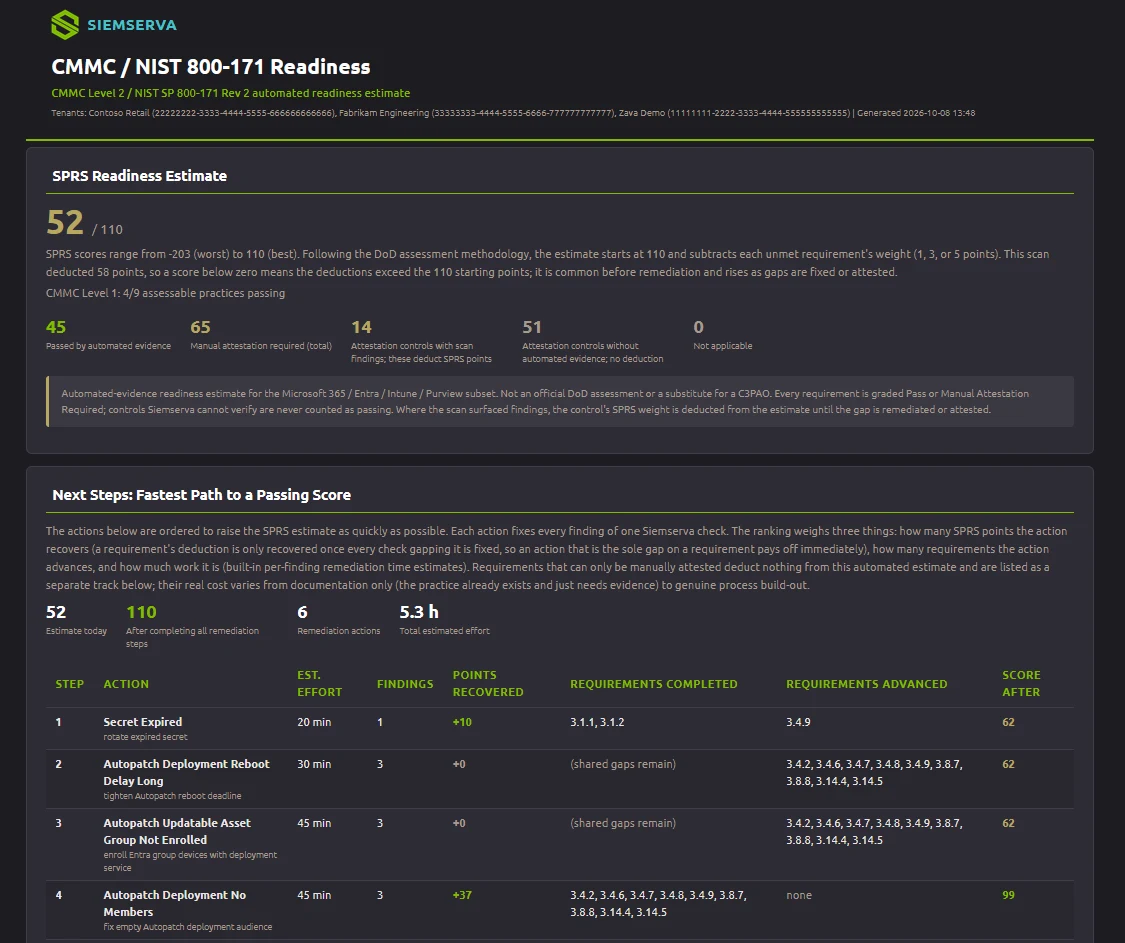
The report grades a Level 2 self-assessment from live tenant configuration. It covers every one of the 110 NIST SP 800-171 requirements, gives evidence for 76 of them from Microsoft 365, Intune, Defender, Entra ID and Purview settings, and names the ones that need a person to answer. Kyle White's post explains how it was built and how the scoring works.
SPRS readiness estimate
Every requirement is graded with the 1, 3 and 5 point weights from 32 CFR 170.24, so the estimate is the same arithmetic the assessment uses. A requirement the audit could not evaluate is marked inconclusive and flagged for manual attestation, never counted as met.
Requirement grades with evidence
Each requirement shows the findings, the objects they were found on, and the dated evidence behind its grade, indexed to the requirement an assessor will ask about. The CMMC by Check companion report turns the same data around: each check, the requirements it affects, and what to fix.
Attestation priorities and next steps
The requirements with the highest score impact come first, so the 3 and 5 point items that would close the Plan of Action and Milestones path sit at the top. Next steps are ordered by the fastest route to a passing estimate.
What an assessor actually asks for
Not a policy document. A CMMC assessor asks whether a practice is implemented and operating, and the artifact that answers is configuration state with a date on it: who has standing privilege, whether legacy authentication is still permitted, whether audit logging is on and retained, what is unpatched and for how long. Those are settings in Microsoft 365, Intune, Defender, Entra ID and Purview, which is exactly what Senserva reads.
Dated, not current
Every finding carries the date it was found and the object it was found on. A dashboard reading is a claim about right now; an assessment needs a record, and a record is a thing with a date.
Coverage as a fraction
A practice is covered, partially covered, or not covered, and the report says which. A percentage with no denominator is the shape of claim this audience has learned to discount.
Critical is earned
A vendor calling something Critical is a vendor opinion. Ours escalates on confirmed exploitation, a CISA KEV listing, or a direct path to tenant compromise, and it can always say which one fired.
The three audits, and what each one is for
Membership of Senserva Watch issues three free unlimited audits, and the sequence matters more than the number. One to find what is there. One to check the fixes landed. One to prove the remediation held, which is the run an assessor is really asking about, because a fix that regressed is not a fix.
| Run | What it answers | Why an assessment cares |
|---|---|---|
| Find it | What is the configuration today, ranked, with dates. | The gap list you would rather write yourself than receive. |
| Fix it | Did the changes actually take effect in the tenant. | An intended change and an applied change are different things, and only one of them is evidence. |
| Prove it | Is it still true a period later. | Assessors ask whether a practice is OPERATING, not whether it was once switched on. |
What we may say, and what we may not
We produce evidence. A certified assessor decides compliance. Senserva is not a C3PAO, holds no FedRAMP authorization and no agency endorsement, and no report we generate makes an organization compliant or certified. Anyone in this market who tells you otherwise is telling you something you can check.
What we do claim, and will stand behind: more than 650 configuration checks across Microsoft 365, Intune, Defender, Entra ID and Purview; findings dated and attributed to the object they were found on; and a mapping from those checks to CMMC practices and NIST SP 800-53 controls that is our reading of the published control text, which is useful and is not a certification.
Read next
- CMMC 2.0, domain by domain: the three levels, the 14 domains, self-assessment against a C3PAO assessment, and which settings become evidence.
- CMMC in GCC and GCC High: which cloud your CUI handling points you at, and what changes in the tenant.
- Senserva Federal: the live federal picture, CISA advisories and BOD 22-01 remediation dates, refreshed daily.
- Every framework we map to, and how a single audit serves more than one of them.