Scan your Microsoft 365 in minutes.
Rank what is risky, remediate fast.

Siemserva by Senserva is an AI-enhanced security posture management and automated remediation product built to work with Microsoft 365, Intune, Defender, Entra ID, Purview, and Azure.

Quick Start includes Download and go. No registration required. Going in seconds.

Microsoft Intelligent Security Association (MISA) member

Watch the overview

A short overview of a Siemserva scan and AI remediation. More videos.

up to 80%

less time spent on Microsoft 365 security

Hardening Microsoft 365 the usual way means weeks of manual work: exporting from a dozen admin centers, hand-writing PowerShell, chasing every fix, and rebuilding audit evidence each cycle.

Senserva collapses all of it into one command. 650+ checks run in minutes, every finding arrives with a validated, ready-to-run fix, and audit-ready evidence is generated automatically, so your existing team covers far more without adding people.

And no, you will not be overwhelmed. The volume is Microsoft 365's, not ours: thousands of settings, identities, and log events exist whether or not anyone looks, and a real audit needs all of them. Siemserva's job is to hide that complexity. Findings arrive in priority order with complete, plain-language descriptions, and drill-down is there when you want it. You only need to know what you need to know, unless you want to know more.

That is how teams cut up to 80% of the time they spend hardening Microsoft 365.

Run it from our UI, from Claude through the Senserva MCP, or with any AI you already use: Siemserva builds the prompt, validates the answer, and writes the report. Every AI output is grounded in your real findings and validated before you act: Senserva Trustworthy AI.

See your security gaps, free

One command, not many consoles
650+ checks across your whole tenant in minutes, instead of exporting and correlating across a dozen admin portals by hand.
Remediation written for you
Every finding arrives with a validated, ready-to-run fix, so you stop researching and writing PowerShell from scratch.
Reports and evidence, automatic
Six AI-enhanced reports and audit-ready compliance evidence on every scan, instead of hours of cut-and-paste per audience.

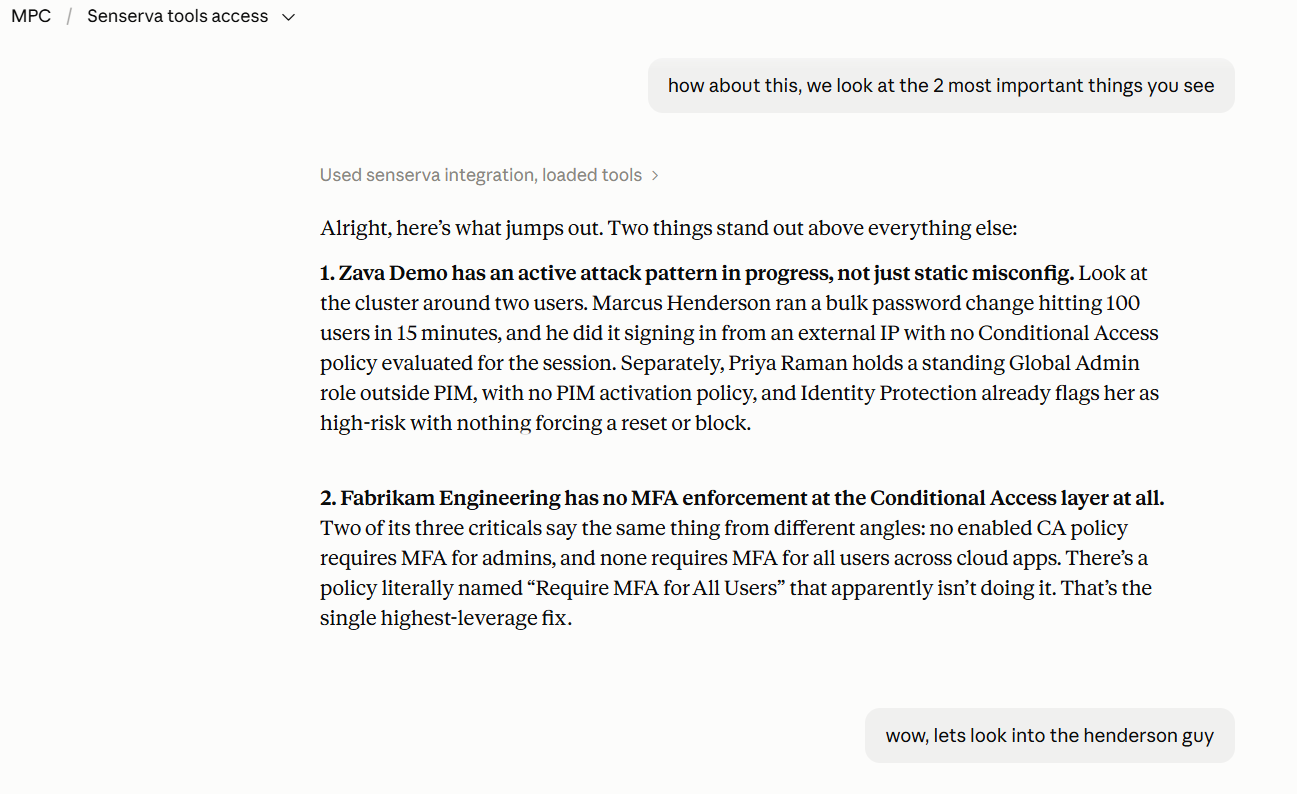
Work with Claude to find security problems you never knew you had

Siemserva ships a market-leading MCP, so Claude (or the AI of your choice) can drive the whole product: scan, investigate, prioritize, and draft the fix. This is a demonstration against our built-in sample tenant.

You can do exactly this today without registering: the MCP demo mode runs on the same sample data, no tenant and no key required.

You
What are the riskiest problems in this tenant right now?
AI
Using the Siemserva scan of this tenant (580 checks evaluated, 273 findings), the three to fix first:
1. Twelve admin accounts are covered by no Conditional Access policy, including two Global Admins. One phished password is the whole tenant.
2. Legacy authentication is still enabled for SMTP, which bypasses MFA entirely.
3. PIM is unused: all 12 admins hold standing privileged access.
I can draft the validated fix for each. Want me to start with the Conditional Access gap?
You
Yes. Draft the Conditional Access fix, and tell me what could break.
AI
Drafted through Siemserva and validated against this tenant's actual data:
New-MgIdentityConditionalAccessPolicy: "Require MFA for admin roles" targeting all 14 privileged role templates, state: report-onlyThe validation found: it covers all 12 uncovered admins, it excludes your break-glass account (BG-Admin01, which the scan identified), and it starts in report-only so nothing breaks on day one. What could break: two of the admins sign in from a legacy VB script that cannot do MFA; the draft lists both so you can fix those first. Say the word and I apply it through Siemserva; your next scan proves the gap closed, and I flip it from report-only to enforced once the sign-in log shows zero would-be blocks for 7 days.

Demonstration conversation against the built-in sample tenant, not live customer data.

Everything Claude and the Senserva MCP can do

The Cost Problem Senserva Solves

Securing Microsoft 365, Intune, Defender, and Entra ID still runs on custom PowerShell, manual exports, and fixes done by hand: slow, costly, and different every time. Senserva replaces it with one signed, read-only binary that scans, scores every finding by real risk, and drafts the fix you approve and apply, then the next scan proves it closed.

Most organizations audit using Which creates How Senserva fixes it
Custom PowerShell or a collection of free scripts for audit and fix work High recurring labor cost, slow remediation cycles One signed binary scans the tenant and writes the remediation PowerShell for every finding
Remediation by hand: a senior admin applies each fix one finding at a time Backlogs that never clear, risky changes with no review trail, and fixes that quietly drift back out of compliance Senserva Trustworthy AI drafts the exact fix for every finding; you review and approve, Senserva applies it, and the next scan proves the gap is closed
Manual exports and correlation across admin portals Two reviews of the same tenant give different answers; heavy dependency on staff knowledge Same scan, same answer, every time. The Senserva Security Context Graph correlates users, roles, devices, apps, and audit events for you
Eyeballing severity, DIY training, scattered docs Hard to know what is actually risky; you are on your own when a finding is unclear Severity scored every scan with plain-language reasoning; Game Mode trains your team on real findings
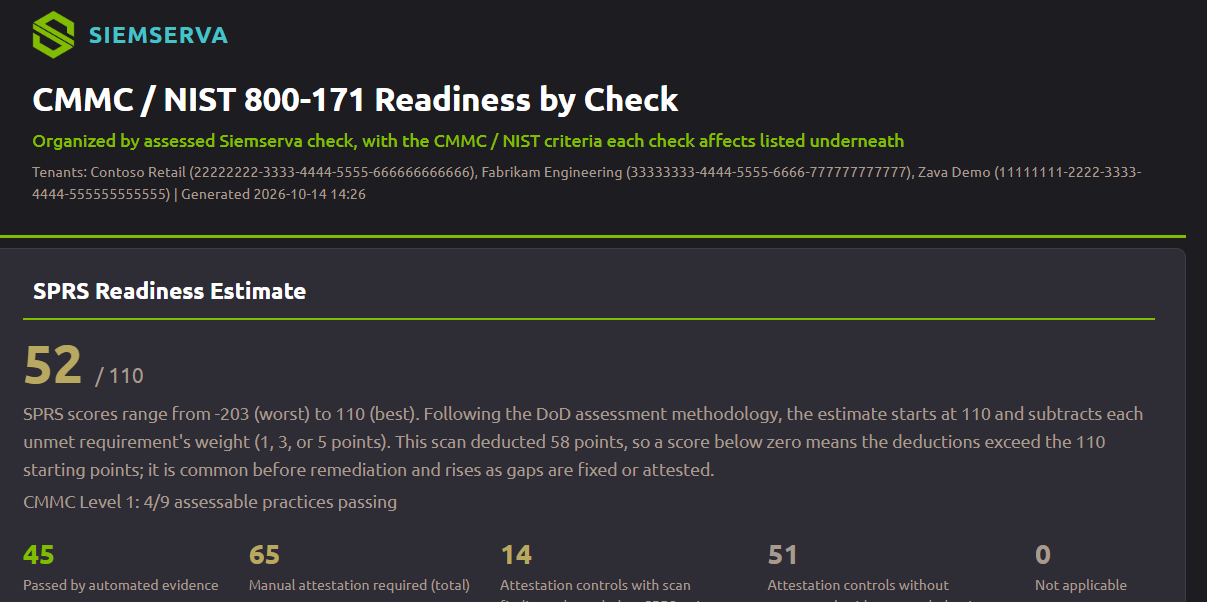
Different report for every audience, exec briefings by hand Hours of cut-and-paste per audit, hours per audience to translate findings Six AI-enhanced reports built in (Detailed, Compliance, Business, Remediation, Audit, Portfolio); build more with the Claude MCP
Compliance mapping and audit evidence by hand MCSB, SCuBA mapping rebuilt every cycle; hours of evidence collection Every finding pre-mapped to MCSB v2 and CISA SCuBA, MCP-bridged to NIST 800-53, 800-171, ISO 27001, SOC 2, HIPAA; audit-ready evidence captured automatically every scan

Register free, scan your own tenants

And it scales: one scanner runs a single tenant or an MSP fleet, with bulk tenant audits and unified client-ready reporting. Senserva for MSPs and MSSPs.

Configuration, patching, and logs, in one model

Siemserva models your configuration, your patching and CVEs, and your logs as one connected model, not three separate tools. That single model is what ranks real risk, powers the AI, and proves the gap is closed on the next scan. It also watches for configuration drift continuously, so what you fixed stays fixed.

Why Senserva: the model, in full  |  Drift management

"Senserva cut my tenant hardening effort by 80%. Setup takes minutes, results are immediate. The AI doesn't just report findings, it reasons about your environment and tells you exactly how to fix them. If you work with Microsoft 365, Intune, or Entra ID, this is the tool you didn't know you were missing." Timo Becirovic, Municipal IT Consulting, ITEBO GmbH

"Senserva exists because good organizations, small and large, were failing audits with tools that weren't built for them. We built one solution that fits a small IT team and works alongside a Fortune 500 security program. For smaller firms it can be the whole solution; for larger firms, part of it. Same core tech, all Microsoft." Mark Shavlik, Founder & CEO. Microsoft NT Kernel team. Founder of Shavlik Technologies (HfNetChk, MBSA).

"Canadian organizations need security assessments they can put in front of an auditor with confidence - and for those operating under Federal data privacy and sovereignty requirements, the bar is higher still. Senserva gives our clients a clear picture of their Microsoft 365, Entra ID, and Intune posture, maps every finding to compliance frameworks, and delivers audit-ready output built on Senserva Trustworthy AI. That combination of assessment depth and provable remediation is exactly why we brought Senserva into our portfolio." Siti Mwakatobe, Director of Sales / Directeur des Ventes, NET-WALL Internet Security, Inc.

"I gave Senserva a test run and the core of the tool is genuinely impressive. Deep Microsoft 365 security findings, with a clear path from 'here's the gap' to 'here's how we fix it.' For MSPs especially, it's the kind of engine that can turn a complicated tenant review into actionable next steps." Simon Ronald, Cybersecurity & IT Director, Brave North Technology

"We believe Senserva provides a great amount of innovation in the Microsoft security world... The Senserva team was great to work with, responsive and focused on meeting our needs." Rich Lilly, Partner, Director of Security, Netrix

"The Senserva team is great to work with, they are responsive and could find any data in Azure we needed. It's amazing really." John McCann, CEO Satisent, A Gamma Company

"... The Senserva team have moved incredibly fast to deliver a compelling approach to Microsoft 365 modern workplace risk visibility. They're surfacing blind spots other tools miss, and their AI-first reporting gives the platform a true voice, helping organizations understand not just what's at risk, but what to do about it." Nick Johnson, Program Manager IT Solutions, Loffler

Members of MISA, like Senserva, offer solutions that extend Microsoft security to quickly identify and remediate security incidents before they cause business impact... Eric Burkholder, PM Technology Partnerships, Azure Sentinel at Microsoft

Senserva, a Microsoft Intelligent Security Association (MISA) member A proud Microsoft Intelligent Security Association member
Siemserva AI-enhanced Microsoft 365 security report

AI-enhanced reports your auditors actually read

Every scan becomes six reports, from a deep technical breakdown to a one-page executive summary, each carrying the evidence, the mapped control, and the validated fix. The AI provides new and powerful insights; the evidence makes them defensible. Self-contained HTML, print-ready for the audit binder.

See the reports

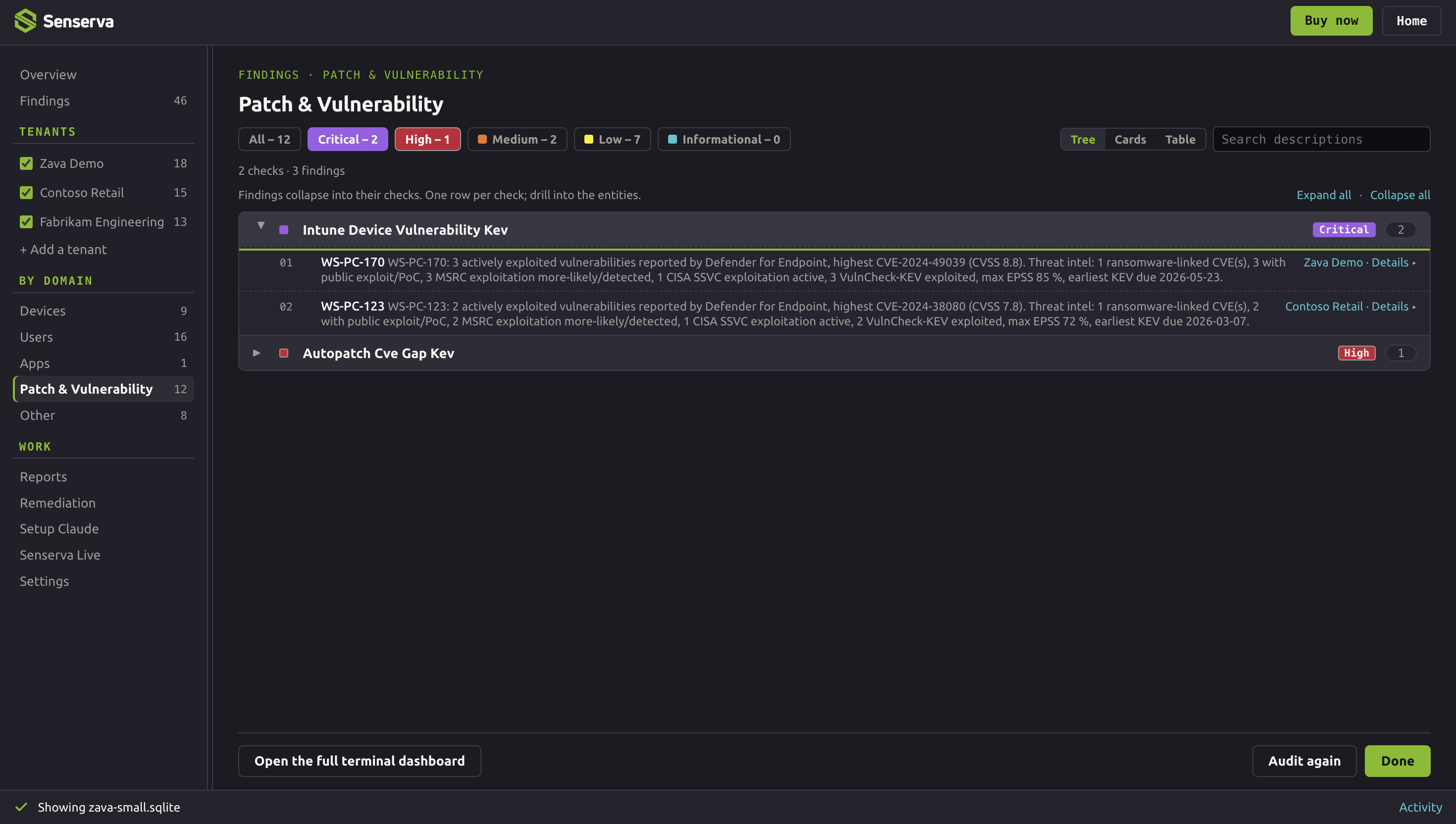
CVEs and missing patches, ranked by what can actually hurt you

A raw CVE list is noise. Siemserva reports the vulnerabilities and missing patches across your estate, enriches each one from the authoritative sources (MSRC, CISA KEV, EPSS), and ranks them by real-world risk, so you fix the handful that matter, not the thousands that do not. Coverage runs the whole pipeline: per-device missing KBs and CVEs, Windows Autopatch and Windows Update for Business audits, third-party software via Defender Vulnerability Management, and a software inventory with per-product CVE counts. The full patch and CVE coverage.

The hottest CVEs right now
See the full ranking
Loading what's hot...

Live from the Senserva CVE Ranking, from Mark Shavlik, creator of HFNetChk and MBSA (the Shavlik story). In your own tenant, Siemserva ranks the CVEs and missing patches on your devices the same way, with a validated fix attached to each. Search the Microsoft CVE reference, or bookmark the hottest CVEs and patches, updated several times a day.

Patching is built into the same scan, not a separate product: see Siemserva patching in action, or the free Microsoft patch tracker the same engine feeds.

Using Siemserva to audit your Microsoft 365

A full Microsoft 365 security audit in one scan: 650+ checks across Microsoft 365, Intune, Defender, Entra ID, and Purview, each mapped to the Microsoft Cloud Security Benchmark and CISA SCuBA, ranked by real risk, and paired with a validated fix. Run it once as a Microsoft security posture assessment, or on a schedule as continuous assurance. The two largest areas alone, the Entra ID audit and device management, carry 200+ and 190+ checks. Here is what a Siemserva Microsoft 365 security assessment covers.

Why so many checks, and why we keep adding more: Microsoft 365 has thousands of settings, permissions, and behaviors that can go wrong, and checking less would weaken your security. The count is the coverage, not your workload: the Siemserva UI is built to manage that data with a focus on the key issues, in priority order, so you work a short list while nothing goes unwatched.

Identity and access (Entra ID)
A full identity risk assessment on every scan: MFA, Conditional Access, PIM, directory and Azure roles, authentication methods and strengths, FIDO2 and Windows Hello for Business, break-glass accounts, and risky users and sign-ins. 200+ Entra ID security checks.
Privileged access
Continuous privileged access monitoring and an Entra ID privileged access review on every scan: eligible versus active PIM assignments, role-management policies and alerts, plus Azure security auditing across subscription role definitions and RBAC assignments.
Applications and service principals
A Microsoft 365 permissions audit across app registrations, OAuth2 grants and scopes, credential hygiene, risky service principals, and app role assignments.
Devices and endpoints (Intune)
Compliance policies, configuration profiles, antivirus, firewall, attack surface reduction, BitLocker, app control, Windows security experience, and update rings. 190+ checks.
Patch and CVE intelligence
Per-device missing patches and CVEs enriched with MSRC, CISA KEV, and EPSS, ranked by the Senserva CVE Ranking so the fixes that matter rise first.
Email security (Defender for Office)
Anti-phishing, anti-malware, anti-spam, and Safe Links policies, checked against a secure baseline.
Logging and threat detection
Unified audit log health, sign-in and directory logs, provisioning logs, and security alerts, so the evidence is there when you need it.
Purview and data governance
Sensitivity labels, retention and records management, unified audit log, and subject rights requests for privacy and DSAR.
M365 workloads and AI
SharePoint, Exchange, Teams, and OneDrive configuration, plus Copilot and AI agent settings, so new surfaces get audited too.

Browse the full catalog of 650+ checks  |  How the checks map to compliance

Validated AI remediation, not just findings

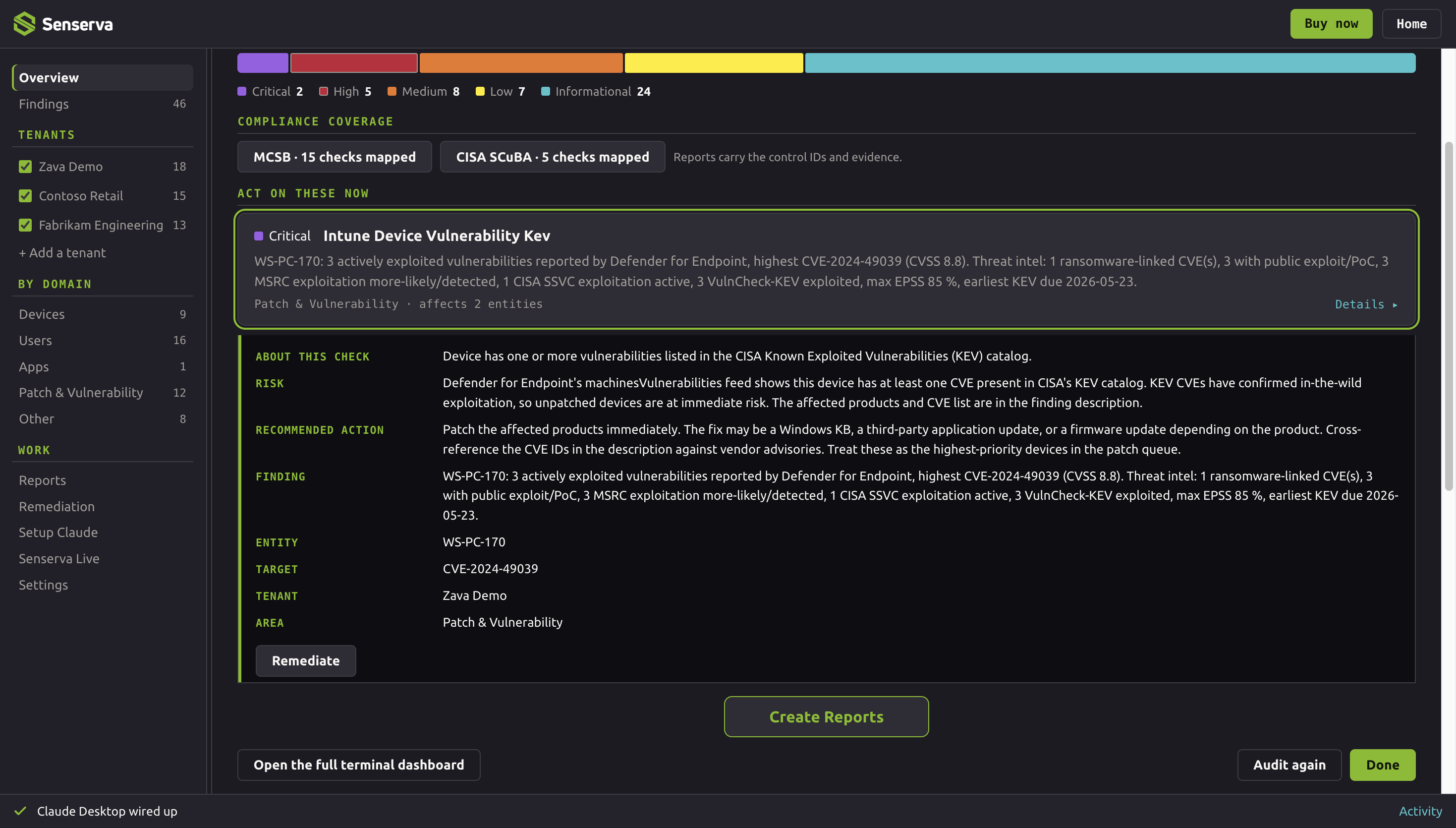
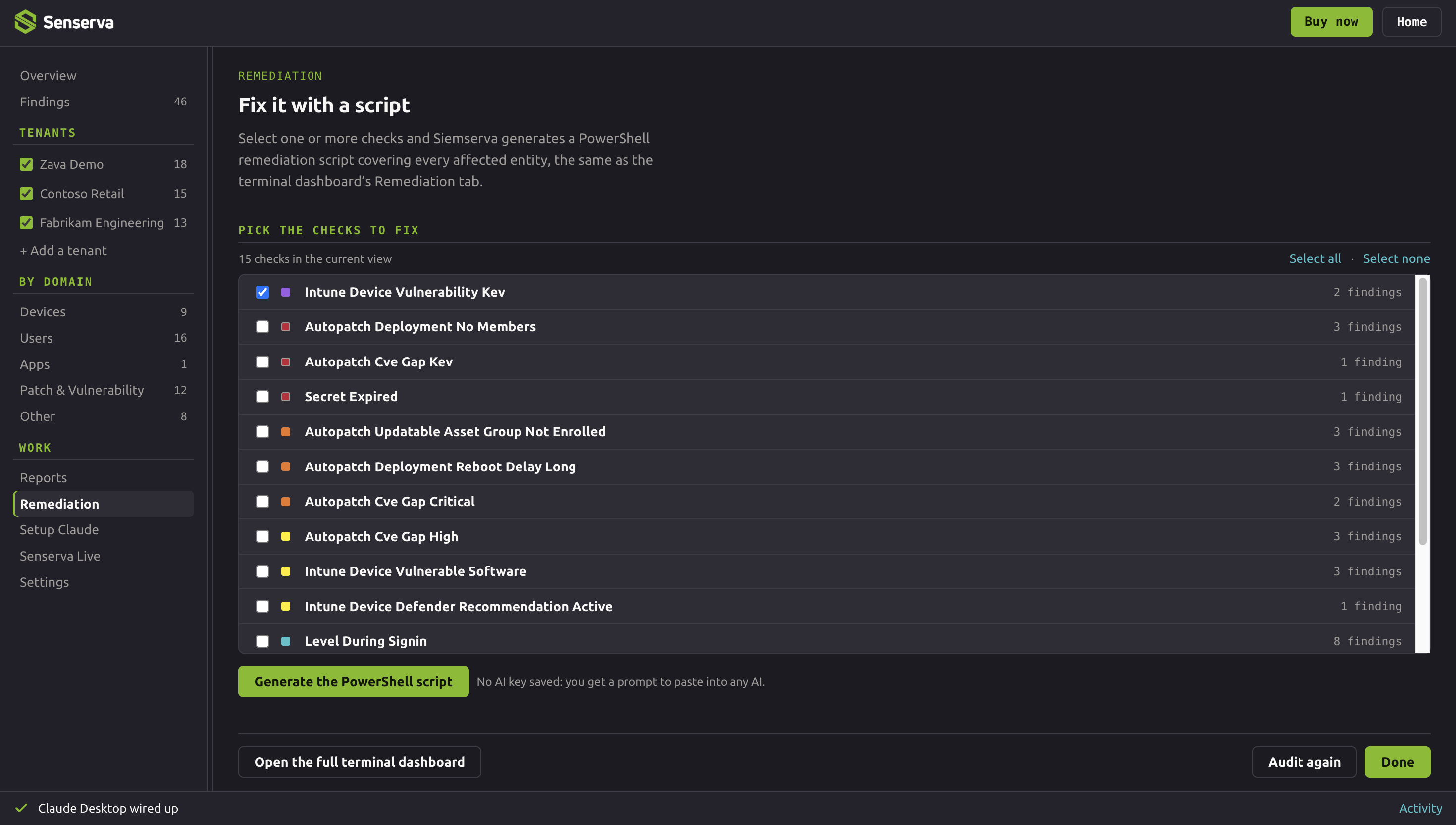
For each finding, Siemserva generates a fix tuned to your tenant and validates it. You review and apply it, often as ready-to-run PowerShell, from the Senserva UI or from Claude through the Senserva MCP. The next scan proves it worked. Prefer a different model? Siemserva works with any AI, from ChatGPT and Gemini to a local model, using its built-in prompt builder and validation.

How validated remediation works

Siemserva validated AI remediation in Claude

AI is on by choice and fully optional: the product is complete without it, and every AI suggestion is validated before you apply it. Senserva Trustworthy AI.

Misconfigurations are half the story. Your logs are the other half.

Most posture tools stop at settings. Siemserva reads your logs too. Alongside 650+ configuration checks, it investigates your sign-in logs, the unified audit log, directory and provisioning logs, and security alerts, so you see not just the door left unlocked, but who walked through it. Risky activity surfaced, ranked, and tied to a fix.

Configuration tells you where you are exposed, patching tells you what is unfixed, and logs tell you whether it is being used against you. Bringing configuration, patching, and logs together in one model is the state of the art for security, and it is what lets the AI reason across your whole estate to create better, grounded solutions. Siemserva does it all, in one scan.

Full Microsoft 365 log analysis  |  Conditional Access gap analysis

"Senserva cut my tenant hardening effort by 80%. Setup takes minutes, results are immediate. The AI doesn't just report findings, it reasons about your environment and tells you exactly how to fix them. If you work with Microsoft 365, Intune, or Entra ID, this is the tool you didn't know you were missing."
Timo Becirovic · Municipal IT Consulting, ITEBO GmbH

Up and running in about 20 minutes

No agents, no pipeline, no professional services. Three steps from install to fixed.

1
Install
Download the small Windows or Mac binary and connect read-only to your tenant through Microsoft's APIs. Nothing is deployed in your environment.
2
Scan
650+ deterministic checks run across Entra ID, Intune, Exchange, SharePoint, OneDrive, Teams, Purview, Azure RBAC, and Copilot, ranked by severity with the evidence behind each finding.
3
Fix
Siemserva drafts validated, ready-to-run remediation for each finding. Review, apply, and the next scan proves the gap is closed.

Run with Claude. The Senserva MCP installs just as fast, so you can drive scans, reports, and remediation from Claude, or the AI of your choice, in plain language, no KQL and no portals. Prefer the full UI, the SDK, or your own scripts and pipeline? That works too. Full quick start  ·  Set up Claude  ·  SDK and pipeline.

Frequently asked

Does Siemserva install agents or use a cloud service?

No. It runs on Windows or Mac and reads your tenant through Microsoft's APIs, read-only and least privilege. No agents, no cloud pipeline, and your data stays with you.

How long does setup take?

About 20 minutes from download to your first findings. You can explore the whole product first, free, on the Advanced Microsoft 365 Security Simulator or the game, with no access to your tenant. See the quick start.

How many checks are there, and can I see the list?

650+ checks across Microsoft 365, Intune, Defender, Entra ID, and Purview, in one scan. You can browse the full searchable checks catalog: each shows what it checks and the risk if you do not.

What does Siemserva check for Conditional Access?

It runs the most powerful Conditional Access evaluator we know of: every policy against every user, app, and condition, finding users no policy covers, risky exclusions, legacy authentication, and report-only policies that were never enforced. See Conditional Access gap analysis.

Does it analyze logs, not just configuration?

Yes. Alongside configuration checks it reads your sign-in logs (a 14-day replay), the unified audit log, directory and provisioning logs, and security alerts, so you see not just the door left unlocked but who walked through it. See log analysis.

Does Siemserva cover CVEs and missing patches?

Yes. It reports CVEs and missing patches across your devices, ranked by real-world risk with CISA KEV and EPSS. See CVE and patch management or search the CVE reference.

Why bring configuration, patching, and logs into one model?

Because risk lives in the overlap. A weak setting on an unpatched account that is also being probed in your sign-in logs is far more dangerous than any one of those alone, but separate tools never see it. Siemserva holds configuration, patching and CVEs, and logs in one connected model, so it ranks that real risk and the AI can reason across your whole estate. See the unified security model.

Is there a free way to try it?

Yes. The Advanced Microsoft 365 Security Simulator and the game are free, no registration or key needed. Registering free unlocks scans of 3 of your own tenants, up to 25 users each, in one verified scan. Education institution and nonprofit discounts are available, and full evaluation keys are available on request, reviewed and verified.

Does it work for MSPs and many tenants?

Yes. Siemserva is multi-tenant and MSP-ready, with bulk tenant audits and unified, client-ready reporting across many customers.

How does the AI work, and does it cost extra?

Siemserva is built for AI from the ground up and runs great without it: every scan delivers deep analysis and production-ready remediation with no AI or API key required. Turn it on for our market-leading MCP: six AI-enhanced report types (Detailed, Compliance, Business, Remediation, Audit, Portfolio), live tenant Q&A from Claude or the AI of your choice, and agent-mode remediation that lands as Microsoft Graph PowerShell SDK v2 scripts your admins already trust. You bring your own model, so there is no AI markup, and the rich data model keeps calls and cost low. See Senserva Trustworthy AI and the MCP and Claude.

What does it cost?

Pricing scales by tenant size, education institution and nonprofit discounts are available, and MSP pricing is available. Full evaluation keys are available on request. Contact info@senserva.com.

Is Siemserva audit-ready?

Yes, by design. Every finding ships with the source data Siemserva used to detect it, the control mapping it satisfies or fails, and a validated remediation step, mapped to every major framework and the verticals your auditor cares about. See the full compliance reference.