Summer Special, built for MSPs
One flat rate, no per-seat math. Cover up to 50 tenants, up to 100 users per tenant, any Microsoft seat from S1 to E7, for $600 / month or $6,500 / year.
For larger tenant counts, or volume, education, and nonprofit pricing, contact us.
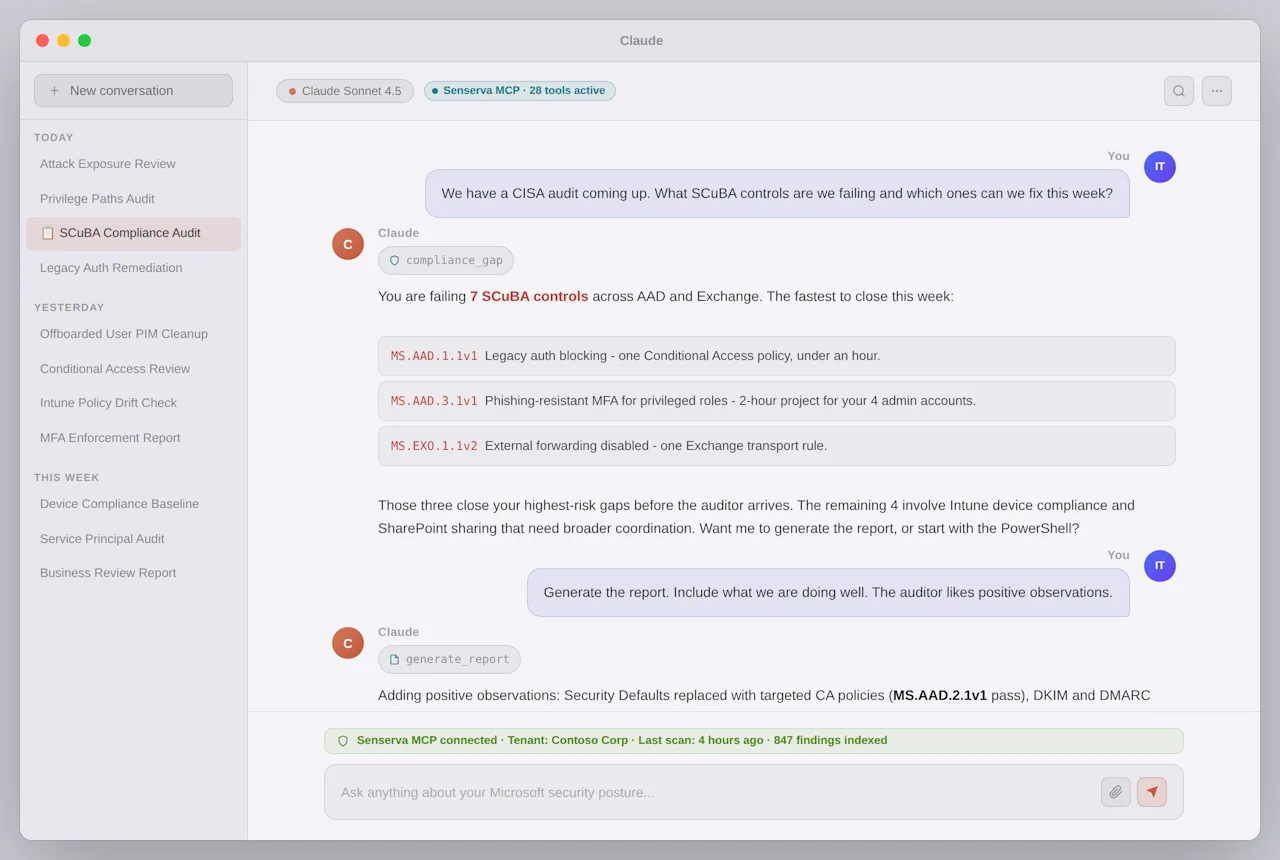
Run a standardized compliance audit on any client tenant, from Claude or the UI.
Where MSP time actually goes
The cost is not any single script. It is the manual loop of running, reading, deciding, and fixing, repeated across every client, forever.
The script graveyard
Every MSP has one: a pile of PowerShell, some written in-house, some lifted from the internet, each checking one slice of Microsoft 365. It is real institutional knowledge, but it has to be run by hand, it breaks when Microsoft changes Graph or adds a new surface, and only one or two engineers actually understand all of it.
Manual work, multiplied by every client
One tenant is manageable. Twenty-five is a job. Each review means running the scripts, reading raw output, and deciding what matters, per tenant, on repeat. Between visits, configurations drift, and there is no single place to see posture across the whole book of business.
Remediation written from scratch
Because every tenant state is unique, the fix usually is too. Engineers copy a script, tweak it for this client, and hope it is right. That bespoke, manual remediation is where much of the real time, and the real risk, lives.
How Senserva gives the time back
The vast security state Senserva already monitors replaces the need for most scripts, and the parts that used to be manual, ranking, remediation, and reporting, become automatic.
One scan replaces most of the scripts
650+ deterministic checks span Entra ID, Intune, Exchange, SharePoint, OneDrive, Teams, Purview, Azure RBAC, and Copilot, the ground your scripts were built to cover, maintained for you as Microsoft changes. Each finding is ranked by severity with the evidence behind it.
AI writes remediation per tenant, automatically
Because each tenant is different, Senserva AI reads the actual state and drafts remediation specific to it, presented as a reviewed step you approve. No more starting the fix from a blank page for every client.
Built for many tenants
Run MSP M365 security scanning and bulk tenant security audits across your whole fleet, with unified, client-ready, compliance-mapped reporting. No agents and nothing to deploy, it reads each tenant through Microsoft\u2019s own APIs.
Drive it all from the UI or Claude
Work in the full Senserva UI, or run the entire product from Claude, or the AI of your choice, through the Senserva MCP. Ask which clients fail a given control, and remediate, in plain language.
Patch state across every client, ranked by real risk
Patching is the MSP bread and butter, and proving it is the hard part. Senserva reads each client tenant through Microsoft's own APIs and turns patch posture into one defensible view per client.
Keep the scripts that are truly yours, with the SDK
You will always have a few checks that are unique to your practice. You do not have to give those up. The Senserva SDK lets you write your own data, checks, and findings into the same Senserva database, so your custom work fills in the blanks and then gets the same treatment as everything else: ranked, AI-remediated, and folded into the same client-ready report.
One data model, one report, one AI, whether the finding came from a built-in check or your own code. Deeper: the Senserva SDK.
What the time savings look like
Teams report cutting Microsoft 365 hardening and review time by up to 80 percent. One longtime customer retired their hand-built PowerShell entirely, moved remediation into Senserva, and won back about 80 percent of the time it used to take.
An illustrative example: a 25-tenant MSP
A genuine, scripted security review, running the scripts, reading the output, and writing remediation, can easily take 4 to 8 hours per tenant when it is done well. Across 25 tenants, that is roughly 100 to 200 hours per review cycle.
Senserva scans a tenant in minutes and drafts the remediation for you. At an 80 percent reduction, a ~150-hour cycle becomes about 30 hours, roughly 120 hours back every cycle for higher-value work, faster onboarding, or more clients on the same team.
These are illustrative figures to show the shape of the savings. Actual numbers depend on tenant size, scope, and how deep your current review goes.
The savings compound: every new client you onboard would have meant another script run and another bespoke fix. Now it is another scan and an AI-drafted remediation.
The MSP workflow, end to end
Onboard a tenant in minutes
Connect read-only through Microsoft\u2019s APIs. No agents, no infrastructure, nothing installed in the client tenant.
Scan and rank
650+ checks run across the whole Microsoft 365 stack, ranked by severity with evidence and compliance mapping.
Let the AI draft the fix
Senserva AI writes remediation tuned to that tenant\u2019s actual state, ready for you to review and approve.
Deliver a client-ready report
Hand the client a clean, compliance-mapped report that proves what you found and what you fixed.
Re-scan on a schedule
Catch drift between visits automatically, so posture does not quietly slip backward.