Microsoft MISA Member  ·  Senserva is Approved by the Microsoft Entra, Sentinel, and Intune Teams

The end of Click-Ops security.

Download at 9 AM. Know Key Gaps by 9:05. Fixed by 9:30.

The scanner that delivers the continuous Microsoft 365 and Entra ID assurance Senserva promises. One signed binary, no agents, no cloud pipeline, runs on Windows and Mac. 600+ checks per scan mapped to 31 MCSB controls and 81 CISA SCuBA codes, plus validated PowerShell remediation with rollback. Built to help prevent attacks like the Stryker Corporation breach (March 2026).

AI Native, AI Optional. Every scan delivers deep analysis and production-ready remediation built on our team's security expertise, no Senserva Trustworthy AI or API key required. Turn Senserva Trustworthy AI on and you get six AI-enhanced report types (Detailed, Compliance, Business, Remediation, Audit, Portfolio), live tenant Q&A in Claude over MCP, and agent-mode remediation. Fixes land as Microsoft Graph PowerShell SDK v2 scripts your admins already trust.

Microsoft Zero Trust Assessment, Maester, and your own PowerShell scripts land in the same Senserva security context graph as native findings, via the Senserva SDK.

Industry-leading free tier: up to 100 users across unlimited tenants, every feature included. Free unlimited for Microsoft MVPs and Microsoft MISA members.

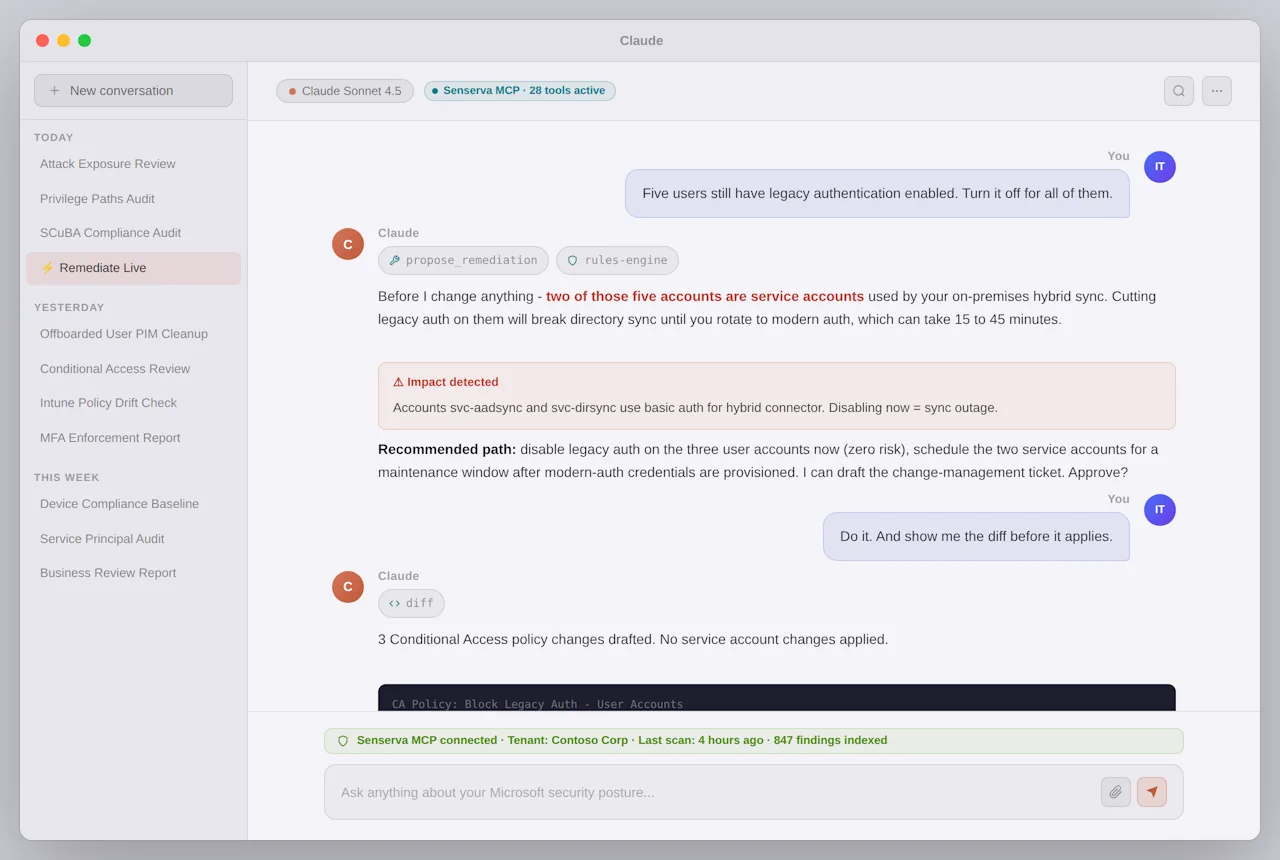
Claude Desktop answering a Microsoft 365 and Entra ID security question using the Senserva MCP server

Two interfaces. Same engine.

Siemserva's 600+ checks, rules engine, and remediation library do not change between surfaces. Pick the one that fits the job. Use both if you want.

Senserva Trustworthy AI is built into Siemserva. Or use Siemserva from inside an AI like Claude.

You are here

Run the scanner.

One signed binary. Live terminal dashboard with filter and drill-down, six HTML report types, validated PowerShell, full CLI. Hands-on for IT admins who want direct control and exportable evidence.

Read the full feature tour on this page.

Conversational

Talk to Claude.

Senserva Claude MCP hands Claude the same live tenant data, validated scripts, and rules engine. Ask questions in plain English. Claude reasons. You approve. The fix ships. Good for busy teams who want to offload the click-ops.

See the Senserva Claude MCP walkthrough

Purpose-Built for Microsoft 365 Security

Get more from the Microsoft security tools you already own. Siemserva surfaces what matters across every domain. One scan, one view, one tool. Microsoft Zero Trust Assessment, Maester, and Nessus (coming) plug in as first-class integrations. Your own PowerShell scripts drop in with zero code changes: emit a Senserva JSON file and they land in the same graph, no SDK required. Want deeper access? The Senserva SDK exposes the full graph in C#, Python, and PowerShell. Every source, native or external, maps to the same compliance controls, dashboard, and AI reports. See also: how Siemserva enhances your Microsoft licensing investment.

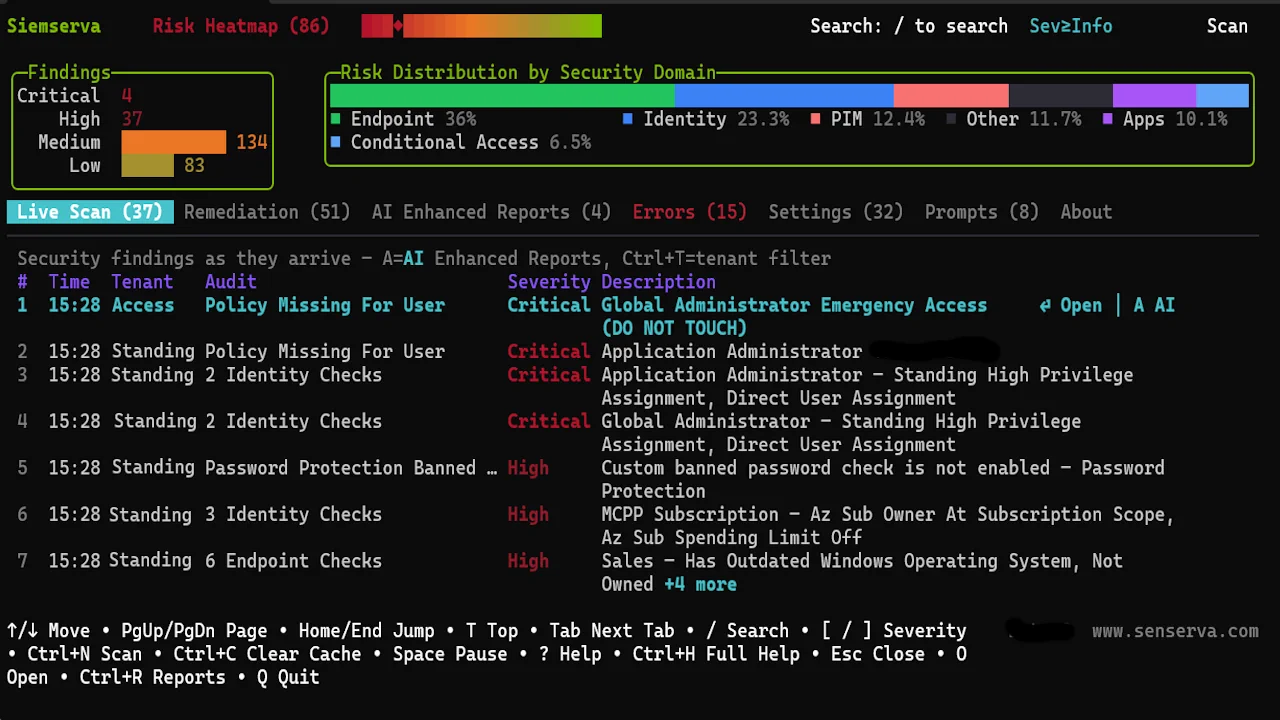
Siemserva live security dashboard showing findings across Microsoft 365 and Entra ID

600+ checks, every Microsoft 365 surface.

A sample of what Siemserva looks at. The real list is long. Run the demo to see it.

  • MFA and phishing-resistant auth
  • Conditional Access gaps and bypass paths
  • Privileged roles and PIM
  • Legacy auth still permitted
  • Guest and external access
  • Intune compliance and baselines
  • App registrations and Graph scopes
  • Email: DMARC, DKIM, SPF, Safe Links
  • SharePoint, Teams, OneDrive sharing
  • Unified Audit Log and alerts
  • Copilot and AI agent governance
  • MCSB and CISA SCuBA mapping

That is a dozen out of 600+. Want the rest? The demo tenant walks through every finding with real data.

Try the demo

Want a guided tour of what the demo tenant holds? Open the Evaluation Guide for named personas, risky apps, Conditional Access gaps, and the scenarios worth hunting.

Siemserva Senserva Trustworthy AI context-sensitive Q&A asking about the scan data in natural language

Your question. Your tenant. Not a template.

Understand & Analyze

Full Scan Analysis. Executive and technical summary in one pass.

Context-Sensitive Q&A. Ask in plain English.

Fix & Remediate

Security Insights. Risk ranked, fix plans with portal paths.

PowerShell. Validated .ps1 for one finding or all.

Report & Share

Six AI-Enhanced Reports. Detailed, Compliance, Business, Remediation, Audit, Portfolio.

MSP-ready. Multi-tenant view, branded Audit report.

Senserva Trustworthy AI-Generated Analysis | Business Focused Review Report

Siemserva Senserva Trustworthy AI-generated security analysis showing risk assessment, executive summary, and recommendations in the Business Focused Review report

Agentic Remediation: From Finding to PowerShell in Seconds

Press P on any finding and watch Senserva Trustworthy AI generate a production-ready PowerShell remediation script scoped to your exact tenant, live, streamed token by token.

Siemserva_Remediation_2026-03-19.ps1
# Siemserva generates production-ready PowerShell scripts
# with change logging, rollback, and -WhatIf support.
# Press P on any finding to generate a script like this:

[CmdletBinding(SupportsShouldProcess)]
param()

# Connects to Microsoft Graph with minimum required scopes
# Finds the misconfiguration identified by Siemserva
# Remediates with full change logging to CSV
# Generates a rollback script automatically
# Supports -WhatIf for safe dry-run testing

Connect-MgGraph -Scopes $RequiredScopes -NoWelcome

# ... remediation logic for this specific finding ...
# ... change log entry written to Senserva_ChangeLog.csv ...
# ... rollback script saved to Senserva_Rollback.ps1 ...

Write-Host "Rollback script: $RollbackFile" -ForegroundColor Cyan
Write-Host "Change log:      $LogFile" -ForegroundColor Cyan

Real output from Siemserva. Press P on any finding, script generates live and saves to disk. Supports -WhatIf dry-run and auto-generates a rollback script.

Senserva security context graph

One Senserva security context graph. Prioritized TODO list with automated remediation for your tenant(s).

Siemserva's internal graph-based security model for Microsoft 365 and Azure. Every user, device, app, role, policy, patch, CVE, finding, and audit event lands in one typed connected model. Many sources, one graph. Senserva adds the edges. Claude traverses, does not guess. Query it from your code.

Native Siemserva checks, Microsoft Zero Trust Assessment, Maester, Tenable Nessus, Senserva Patch Manager, Microsoft Defender TVM, NVD, CIRCL, and CISA KEV all flow in, every row tagged with its source so you can filter native from imported. Patches link to CVEs, CVEs to CISA KEV, devices to owners, apps to OAuth scopes, users to roles, roles to privilege paths. Senserva Trustworthy AI adds natural-language context, severity reasoning, and remediations on top. The Senserva MCP server exposes the graph as typed tools so Claude reads the rows and reasons, instead of pattern-matching. The Senserva SDK opens the same graph through C#, Python, and PowerShell; it is SQLite on disk, so sqlite3, DBeaver, DataGrip, pandas, or any SQL tool works out of the box.

Security context is not just permissions

It is the full situational picture around every action, identity, and resource. The graph binds all of it into one connected model.

Identity
user, guest, service principal, managed identity
Privilege
role assignments, admin scopes, delegated and app permissions
Access paths
group nesting, role inheritance, Conditional Access, OAuth
Activity
sign-ins, audit logs, workload actions
Controls
policies, MFA, Conditional Access, device state
Compliance meaning
SCuBA, CIS, MCSB, custom controls
Risk semantics
severity, privilege impact, blast radius
Why a graph, not tables?

Security questions are relationship-heavy. Tables force you to stitch joins together in your head. A graph answers them directly.

  • "Which non-employees can indirectly reach Exchange admin?"
  • "What paths exist from a compromised app registration to SharePoint data?"
  • "Why is this audit failing high risk instead of medium?"
Relationships are first-class. Edges are typed, not inferred.
Transitive privilege paths are natural. Walk the chain, do not reconstruct it.
Cycles, inheritance, indirect trust are visible. Hidden escalations surface.
Queries become security reasoning. Not just filtering rows.

Same graph underneath the TUI dashboard, the Trustworthy AI reports, the Claude MCP, and the SDK. One source of truth for every tenant you own.

Live Dashboard: See Everything in Real Time

A full-screen terminal dashboard that makes security data usable. Findings stream in live as the scan runs.

siemserva: zava.onmicrosoft.com
SIEMSERVA
Risk: 67
Live Scan 147 Remediation 42 Senserva Trustworthy AI Enhanced Reports Errors Settings About
# Severity Type Tenant Description
1 Critical Conditional Access Zava No Conditional Access policy enforces MFA for all users
2 Critical Privileged Access Zava Break glass account missing MFA exclusion
3 High App Security Zava 3 app registrations with expired credentials
4 High PIM Roles Zava Global Admin role allows permanent assignment
5 Medium Endpoint Security Zava 14 devices non-compliant with OS policy
6 Medium Authentication Zava SMS auth still enabled for 28 privileged users
7 Low Email Security Zava Anti-phish policy missing user impersonation

Reports and compliance, mapped to the frameworks auditors ask for

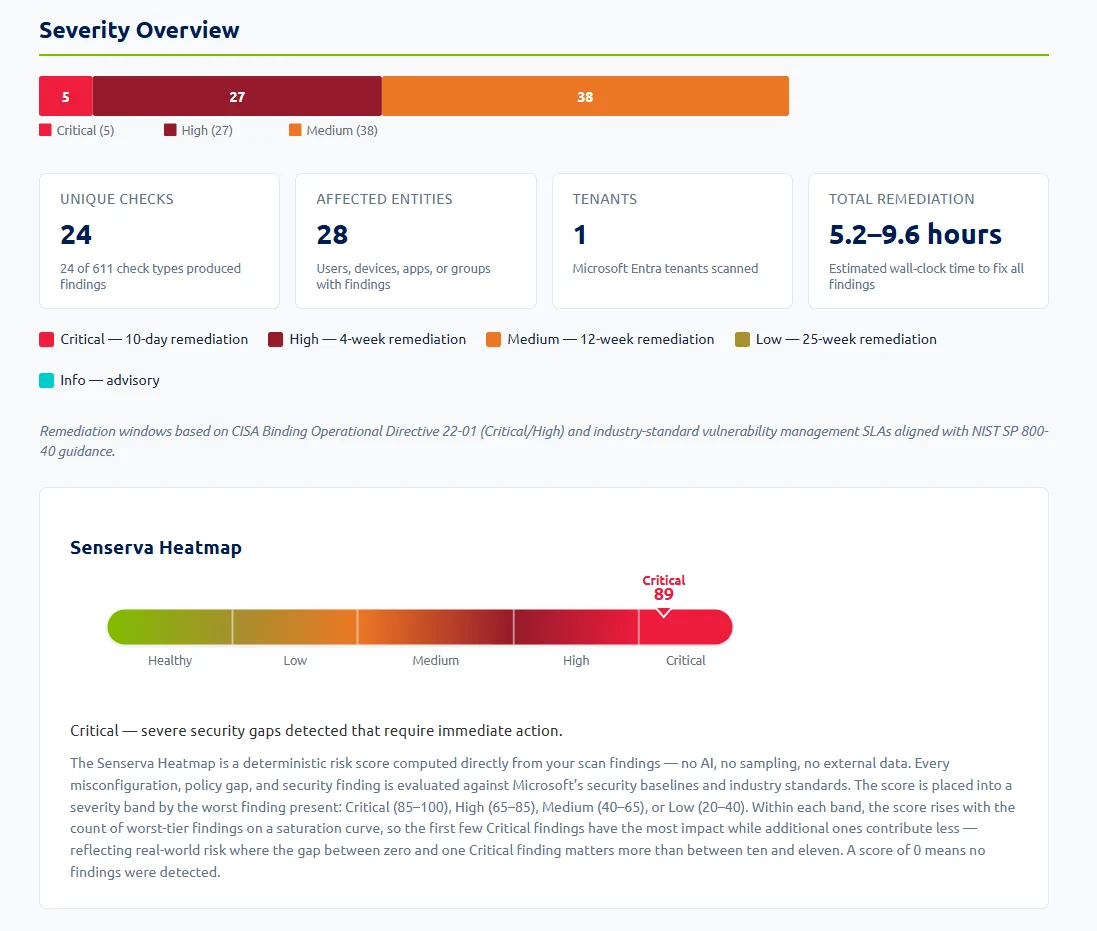
Every finding is cross-referenced against MCSB v2 and CISA SCuBA automatically. Six self-contained HTML reports, one keystroke, opens in any browser, prints to PDF. Senserva Trustworthy AI-enhanced when the key is on, fully functional when it is not.

Siemserva SCuBA scorecard table showing real CISA SCuBA control codes with pass/fail status

SCuBA scorecard: 81 control codes across 7 product families, mapped and scored in every scan.

Technical teams
Detailed
Full drill-down, entity-level, searchable. The complete picture.
Audit
Pass, fail, not-run with numbered findings. Ready for an auditor.
Compliance & leadership
Compliance
MCSB and CISA SCuBA control status with gap analysis. Assessment-ready evidence.
Business focused review
Findings translated into risk, cost, and investment decisions. Board-ready.
SOC, ops & MSPs
Remediation
Priority-ordered fixes, portal links, time estimates, and PowerShell scripts ready to run.
Portfolio
Cross-tenant comparison for MSPs and MSSPs. Shared recommendations across all managed tenants.

Trusted by Microsoft. Proven in the Field.

Senserva is a Microsoft MISA member (Microsoft Intelligent Security Association) and Microsoft Security Excellence Awards finalist. Built by the team behind Shavlik Technologies.

What Microsoft MISA means to Senserva

Membership is not a marketing credential. It is four working relationships with Microsoft that show up in every Siemserva release: Microsoft security direction, a working member network, airlifts to Redmond, and private product-team briefings.

MEMBER OF THE Microsoft Intelligent Security Association Microsoft

Microsoft MISA Member

Invited to join the Microsoft Intelligent Security Association for deep integration with Microsoft 365 and Entra ID security, including Intune and Defender.

Patent US11729201B2

What is Microsoft MISA?

Microsoft MISA (the Microsoft Intelligent Security Association) is an ecosystem of independent software vendors and managed security service providers that have integrated their solutions with Microsoft's security products.

  • Membership is by invitation only
  • Members undergo technical validation by Microsoft
  • Deep product integration with Microsoft 365 and Entra ID security
  • Co-sell and co-market with Microsoft's global security team
Microsoft Security Excellence Awards 2024 Microsoft Intelligent Security Association FINALIST Senserva Security ISV of the Year

Security ISV of the Year

Finalist in the 2024 Microsoft Security Excellence Awards, recognized for impact in Microsoft 365 security.

From the blog

Reading from the Senserva team.