Watch: Microsoft 365 compliance and audit with Senserva, every finding mapped to CISA SCuBA, MCSB, NIST, ISO 27001, SOC 2, HIPAA and more.
New to these frameworks? Start with the compliance requirements guide: who each framework applies to, what it demands, and the Senserva artifacts that help, with links to every official source.
Patching and log monitoring are explicit requirements
Most frameworks name two things auditors check directly: keeping systems patched, and monitoring your logs. Senserva covers both in the same scan, with the evidence attached. Cyber insurers ask for the same controls: see cyber insurance readiness.
Compliance view, generated automatically
One scan produces the Compliance tab below. Each row is a Microsoft 365, Intune, or Entra ID finding with the framework codes it satisfies (or fails) right next to it. Filter by code, jump to the failing finding, export to HTML, or pipe the same data into Claude over MCP.
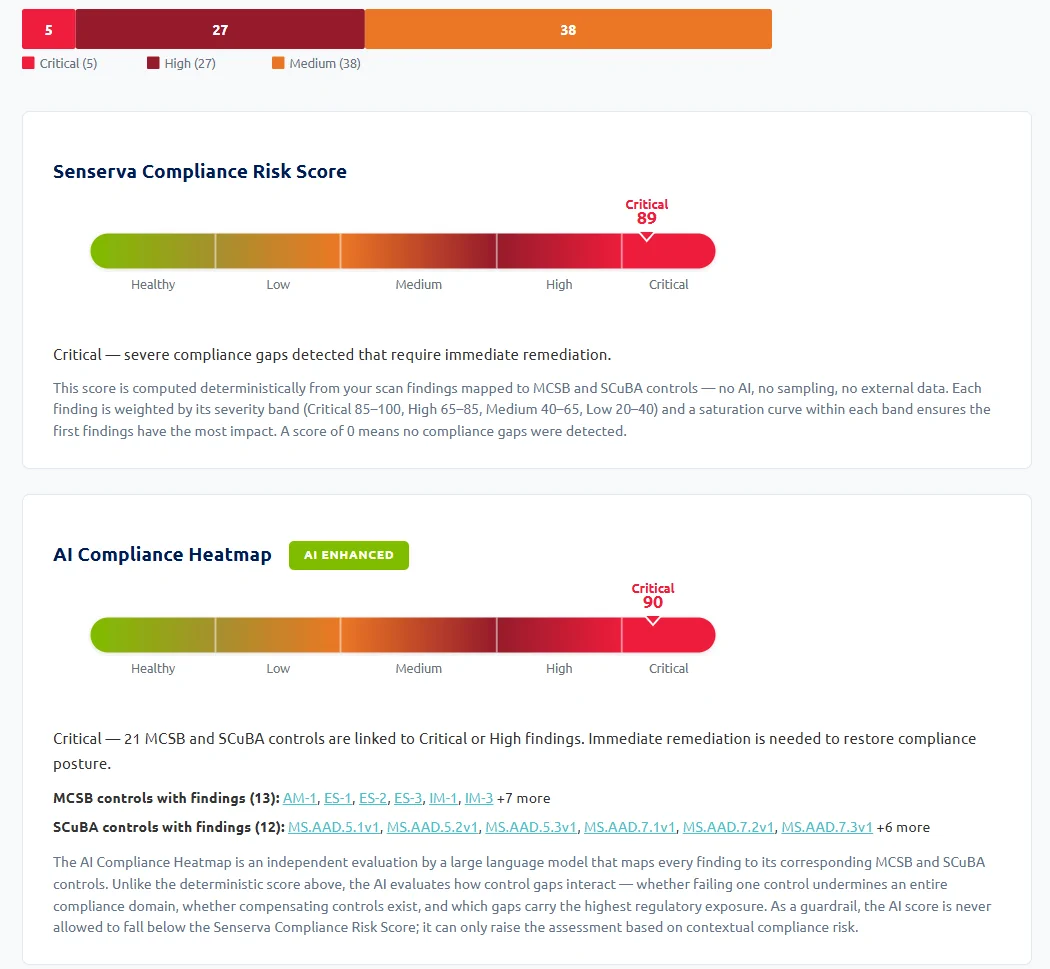
Compliance tab in the live dashboard. Same data lands in the HTML report and the MCP tool responses.
What lands in the evidence packet
Compliance is not a list of issues. It is a list of issues with proof. Every Senserva HTML report ships the four things an auditor asks for on the same finding row, so there is no separate document to assemble after the scan.
Named entity, severity, the specific configuration or gap, and which Microsoft 365 / Intune / Entra ID workload it lives in.
Underlying scan data Senserva used to reach the conclusion: policy assignment, user properties, sign-in trace, audit-log event, group-membership chain. Reproducible, not synthesized.
MCSB v2 and CISA SCuBA codes attached at the row level on every scan. Ask Claude over the Senserva MCP to bridge to NIST 800-53, NIST 800-171, ISO 27001, SOC 2, HIPAA, PCI-DSS, CIS Controls, MITRE ATT&CK, and Microsoft ZTA.
A validated, step-by-step fix written by Senserva Trustworthy AI. Where possible, an attached PowerShell script ready for review and apply, plus a re-prove pass after the fix lands.
One scan. One self-contained HTML file. Prints to PDF for the audit packet. Try it on the demo →
Three concrete examples
What a Senserva finding looks like with the compliance mapping attached. These are not mock-ups: this is the same data shape the dashboard, the HTML reports, and the MCP tools all return.
SCuBA scorecard, one keystroke away
Press C in the dashboard for the SCuBA-by-code scorecard. Every required code, pass or fail, with the count of failing findings and a one-click jump to the offending row. Same view exports to HTML for compliance review packets.
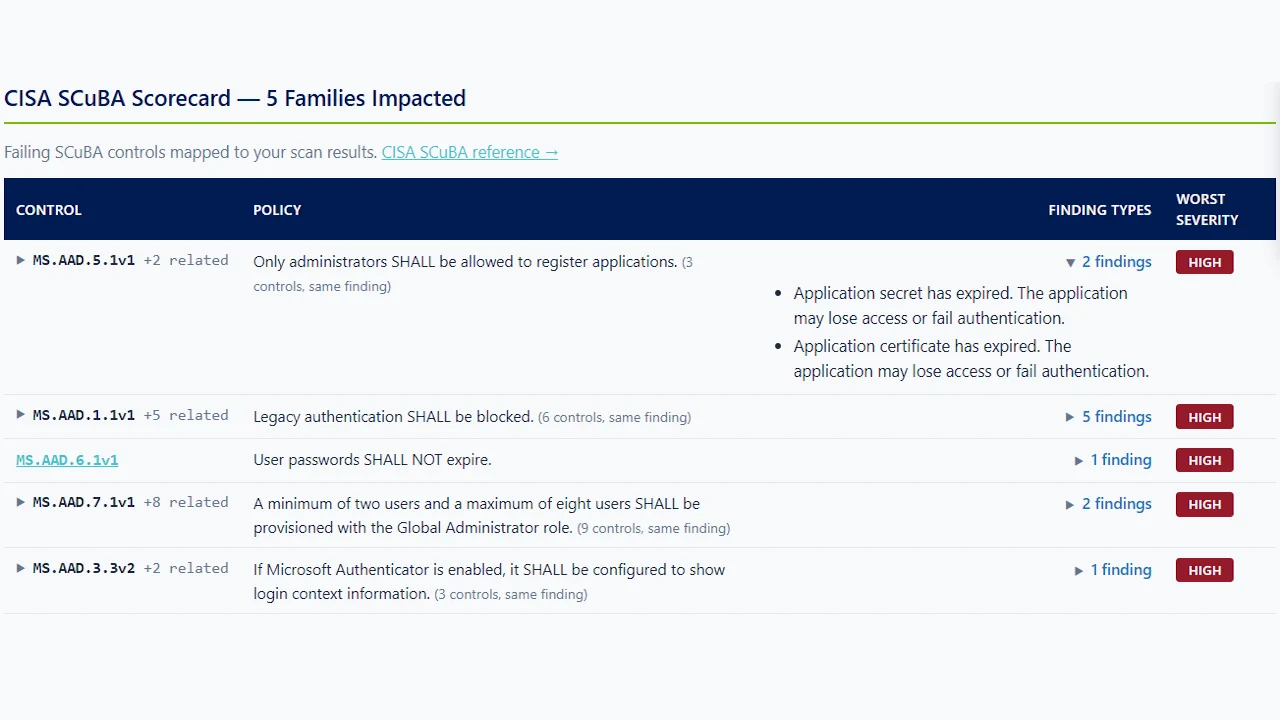
Mapped to what your auditor asks for today, and what regulated teams need next
Every Senserva scan ships framework mappings natively, with more reach through the Senserva Trustworthy AI and Claude MCP layer. Government and defense coverage is next.
Available today
- Microsoft Cloud Security Benchmark v2 (MCSB), 31 controls, native in every report
- CISA SCuBA, 81 codes, native in every report
- Microsoft Zero Trust Assessment alignment
- NIST 800-53, ISO 27001, SOC 2, HIPAA, PCI-DSS, CIS Controls, MITRE ATT&CK, bridged live through the Senserva Trustworthy AI and Claude MCP layer using the same scan data as evidence
- Patch and vulnerability evidence. Almost every framework requires patch management proof. Senserva carries device patch coverage enriched with MSRC, CISA KEV, and EPSS, a double-check across whatever patching tools you run, in one unified report.
Coming in Q3 2026
- CMMC. Cybersecurity Maturity Model Certification mapping for defense contractors and the DIB supply chain.
- NIST 800-171. Native control mapping for Controlled Unclassified Information (CUI) handling, the backbone of CMMC Level 2.
- GCC and GCC High. Government Community Cloud support so public sector and defense tenants can scan Microsoft 365, Intune, Defender, Entra ID (logs included), CVEs, and Purview in their own environments.
Targeting Q3 2026. Want early access or to influence the control mappings? Tell us about your requirements.
Helpful links
The frameworks and benchmarks Senserva maps findings to. Each opens in a new tab.
- Microsoft cloud security benchmark (MCSB): microsoft's baseline of security controls mapped to major frameworks
- CISA SCuBA: cISA's Secure Cloud Business Applications baselines for Microsoft 365
- NIST SP 800-53: the NIST catalog of security and privacy controls for information systems
- NIST SP 800-171: protecting controlled unclassified information in nonfederal systems
- CIS Benchmarks: consensus-based secure configuration guidelines from the Center for Internet Security
- ISO/IEC 27001: the international standard for information security management systems
- SOC 2 (AICPA): the AICPA reporting framework for security at service organizations
- HIPAA Security Rule: the U.S. HHS Security Rule for protecting electronic health information
- PCI DSS: the Payment Card Industry Data Security Standard
- MITRE ATT&CK: the knowledge base of adversary tactics and techniques