1 Demo Mode

No Azure Admin Login required to Demo

One command seeds a fully simulated Microsoft 365 and Entra ID world on your machine. Rich data, real findings, zero risk. The easy path that shows off what Senserva Siemserva actually does.

Try the Zava demo, Senserva's simulated, security-data-rich tenant

demo

A simulated three-tenant world: ~1,300 users, ~1,400 devices, 130 apps, 370 service principals. One command builds a local Senserva security context graph. Pick your surface:

  • Minimal setup. No admin consent, no PowerShell, no network calls.
  • Rich data to learn with. Real-shaped findings across identity, devices, Conditional Access, apps, PIM, patches, and CVEs. Nothing to generate yourself.
  • Same graph, same dashboard. What you learn here is exactly what you see when you point it at your own tenant.
First run, do this once Activate your free subscription, no trial clock.
  1. Sign up for the free plan on the Microsoft Marketplace. Open the marketplace offer . An Azure subscription is required to accept the marketplace offer; the Siemserva plan itself is $0. The confirmation page shows your Subscription Tenant ID and Offer ID (both 36-character GUIDs).
  2. Initialize the license. Run siemserva-win-x64.exe setup-license and paste the two IDs when prompted. Siemserva stores them encrypted and verifies on each run.
Interactive dashboard
> siemserva-win-x64.exe demo dashboard
Ask Claude in plain English
> siemserva-win-x64.exe demo claude

demo claude defaults to Claude Desktop. Add --cli to target Claude Code instead.

Want to preview what's inside? Open the Evaluation Guide for named personas, risky apps, Conditional Access gaps, and the scenarios worth hunting. The same guide ships as SiemservaEvaluationGuide.pdf inside every signed release, so you can read it offline too.

Already know you want to scan your real tenant? Skip to Step 3 →

2 Pick how you want to look at it

Claude Desktop or the Siemserva dashboard

Both read the same Senserva security context graph on disk. Use whichever fits how you work today. You can switch any time.

Conversational

Claude Desktop with Senserva Siemserva

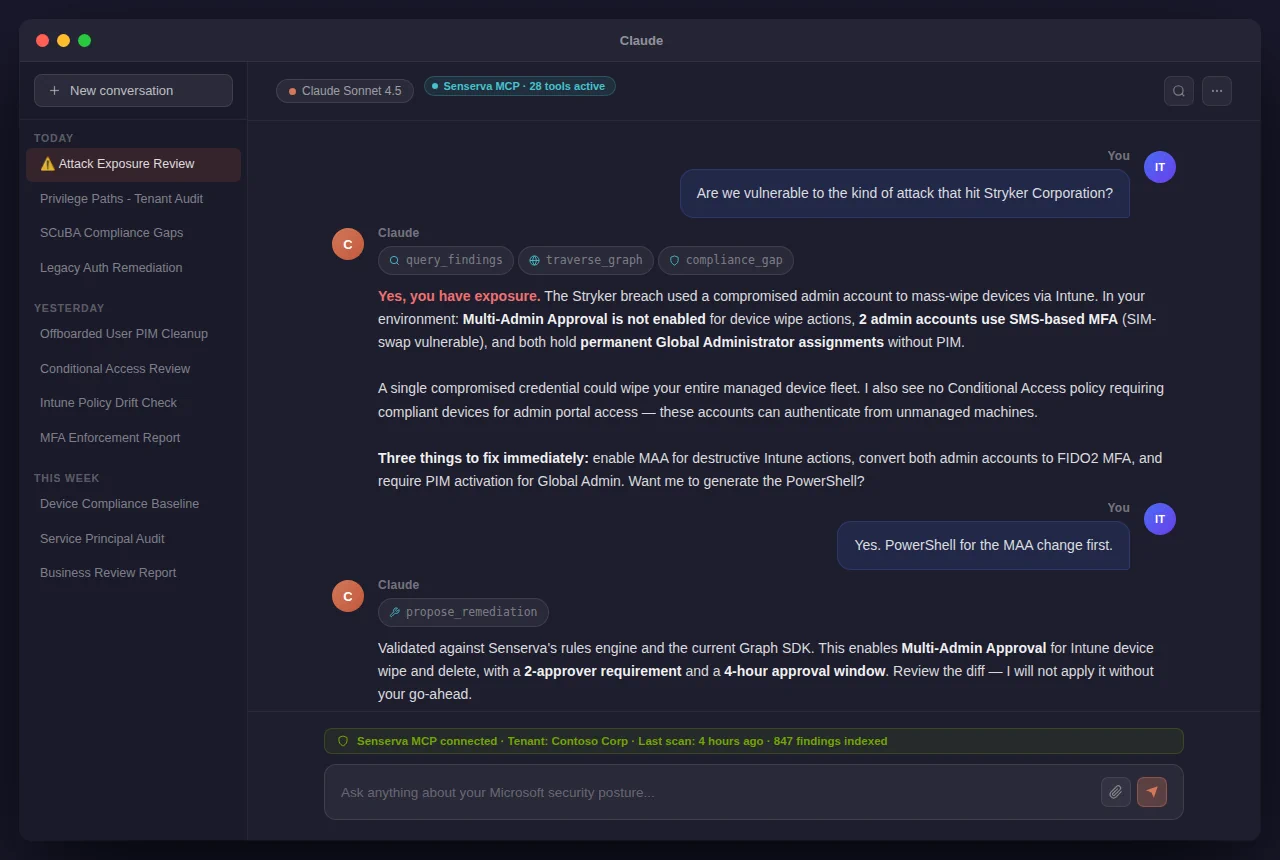
Ask natural-language questions. "Which Global Admins have no MFA?" "Show me every stale privileged account." Claude pulls answers straight from your graph over MCP.

Claude Desktop answering a Microsoft 365 and Entra ID security question using the Senserva MCP server

Pick this if: you want to explore, ask open-ended questions, or hand off findings to stakeholders as prose.

Set up Claude MCP
Don't have Claude Desktop yet? Install in 3 steps
  1. Download from claude.ai/download (macOS and Windows).
  2. Sign in with your Anthropic account. A free account works; Claude Pro or Max gets you higher limits.
  3. Add the Senserva MCP server from Claude's Settings → Connectors. Point it at your .sqlite from Step 1. Full walkthrough on the Claude page.
Interactive TUI

Siemserva dashboard

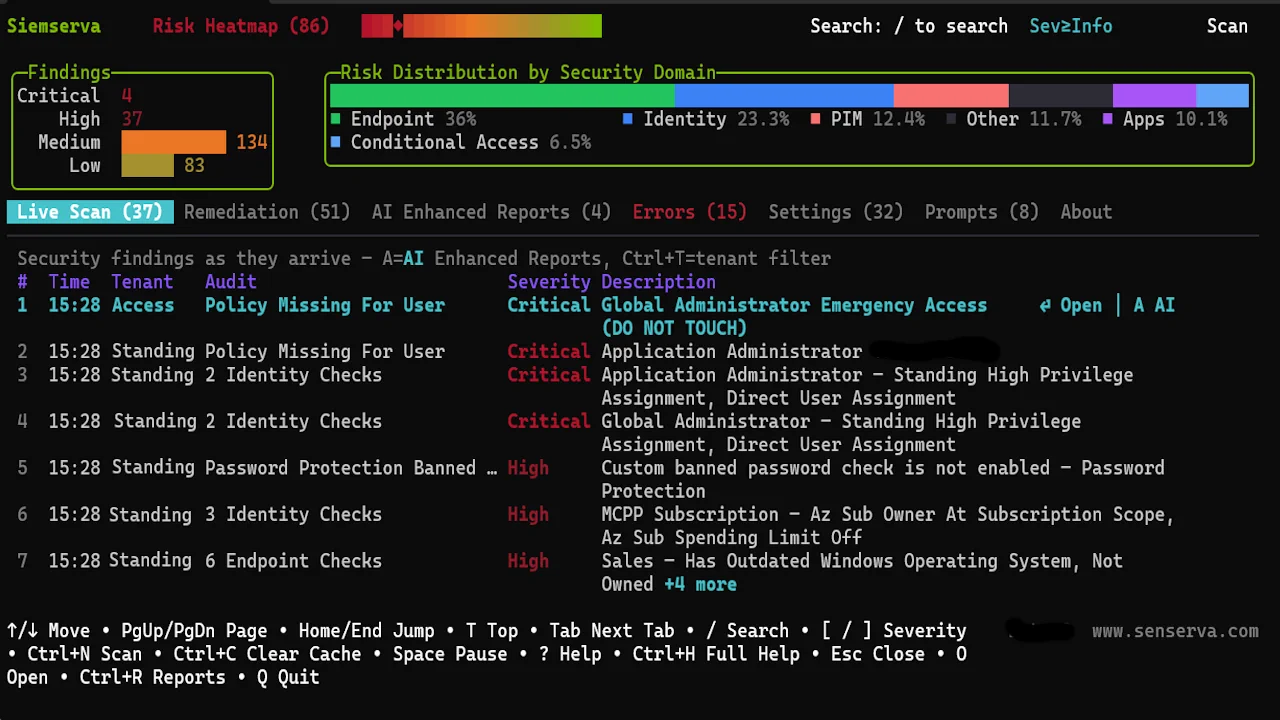
A live terminal dashboard. Arrow keys navigate, Enter drills in, F5 to F9 open overlays, R builds reports. Fast, keyboard-driven, zero UI dependencies.

Siemserva live dashboard with findings sorted by severity and compliance filters

Pick this if: you want to triage fast, filter by severity or compliance, and generate self-contained HTML reports.

Open the dashboard tour
Key bindings at a glance Press ? any time
  • / navigate, Enter to drill in, Esc back out.
  • F5 Users, F6 Devices, F7 Apps, F8 Conditional Access, F9 Compliance.
  • R to build a report, A for Senserva Trustworthy AI analysis, ? for the full keymap.

Want a guided tour of the demo Senserva security context graph? Open the Evaluation Guide for named personas, risky apps, Conditional Access gaps, and the scenarios worth hunting.

3 Make it yours

Point it at your real tenant.

One command, one Global Admin consent, you are scanning. Free for your first 100 users. Beyond that, pricing starts at $99/month for 1,000 users.

Scan your tenant

Read-only scan

Sign in with a read-only Graph admin account and scan your real Microsoft 365 and Entra ID tenant. A Global Admin consents to the Senserva Entra ID app once; every later scan is one command.

$ ./siemserva-osx-arm64 --login
Show the setup steps download · login · consent · scan
  1. Download the signed binary (under 60 MB). Once you register for the free plan on the Microsoft Marketplace, we email you a login location where you can pull the binary for your platform. Every build is digitally signed: Notarized for macOS, Azure Artifact Signed for Windows.
  2. Make it executable (macOS only). chmod +x ./siemserva-osx-arm64
  3. Sign in. A browser window opens; use any account with read permissions to the tenant. ./siemserva-osx-arm64 --login
  4. Grant Graph consent once. A Global Admin approves the read-only scope set. Future scans reuse the cached token.
  5. Wait 6 to 9 minutes for a mid-size tenant. The dashboard opens with findings sorted by severity. ? shows the full keymap.
Optional: pre-create the app registration PowerShell script

Only if your tenant requires admins to pre-approve app registrations.

View source on GitHub
####################################

# Senserva Siemserva App Registration Setup Script
# Copyright 2026 Senserva, LLC
# Author: Thomas (TJ) Dolan

####################################

# Install Microsoft Graph Module, this piece can take a minute. Can omit if you have the module already
Install-Module Microsoft.Graph

Connect-MgGraph -Scopes "Domain.Read.All, Application.ReadWrite.All"

$TenantId = (Get-MgOrganization).Id

# Create the App Registration properties

# Necessary API Permissions

$requiredGrants = New-Object -TypeName System.Collections.Generic.List[Microsoft.Graph.PowerShell.Models.MicrosoftGraphRequiredResourceAccess]
$requiredGraphResourceAccess = New-Object -TypeName Microsoft.Graph.PowerShell.Models.MicrosoftGraphRequiredResourceAccess
$requiredGraphResourceAccess.ResourceAppId = "00000003-0000-0000-c000-000000000000"
$requiredGraphResourceAccess.ResourceAccess += @{ Id = "e4c9e354-4dc5-45b8-9e7c-e1393b0b1a20"; Type = "Scope" } # AuditLog.Read.All
$requiredGraphResourceAccess.ResourceAccess += @{ Id = "f1493658-876a-4c87-8fa7-edb559b3476a"; Type = "Scope" } # DeviceManagementConfiguration.Read.All
$requiredGraphResourceAccess.ResourceAccess += @{ Id = "314874da-47d6-4978-88dc-cf0d37f0bb82"; Type = "Scope" } # DeviceManagementManagedDevices.Read.All
$requiredGraphResourceAccess.ResourceAccess += @{ Id = "49f0cc30-024c-4dfd-ab3e-82e137ee5431"; Type = "Scope" } # DeviceManagementRBAC.Read.All
$requiredGraphResourceAccess.ResourceAccess += @{ Id = "0e263e50-5827-48a4-b97c-d940288653c7"; Type = "Scope" } # Directory.AccessAsUser.All
$requiredGraphResourceAccess.ResourceAccess += @{ Id = "06da0dbc-49e2-44d2-8312-53f166ab848a"; Type = "Scope" } # Directory.Read.All
$requiredGraphResourceAccess.ResourceAccess += @{ Id = "5f8c59db-677d-491f-a6b8-5f174b11ec1d"; Type = "Scope" } # Group.Read.All
$requiredGraphResourceAccess.ResourceAccess += @{ Id = "bc024368-1153-4739-b217-4326f2e966d0"; Type = "Scope" } # GroupMember.Read.All
$requiredGraphResourceAccess.ResourceAccess += @{ Id = "8f6a01e7-0391-4ee5-aa22-a3af122cef27"; Type = "Scope" } # IdentityRiskEvent.Read.All
$requiredGraphResourceAccess.ResourceAccess += @{ Id = "ea5c4ab0-5a73-4f35-8272-5d5337884e5d"; Type = "Scope" } # IdentityRiskyServicePrincipal.Read.All
$requiredGraphResourceAccess.ResourceAccess += @{ Id = "d04bb851-cb7c-4146-97c7-ca3e71baf56c"; Type = "Scope" } # IdentityRiskyUser.Read.All
$requiredGraphResourceAccess.ResourceAccess += @{ Id = "7427e0e9-2fba-42fe-b0c0-848c9e6a8182"; Type = "Scope" } # offline_access
$requiredGraphResourceAccess.ResourceAccess += @{ Id = "37f7f235-527c-4136-accd-4a02-d197296e"; Type = "Scope" } # openid
$requiredGraphResourceAccess.ResourceAccess += @{ Id = "572fea84-0151-49b2-9301-11cb16974376"; Type = "Scope" } # Policy.Read.All
$requiredGraphResourceAccess.ResourceAccess += @{ Id = "a6ff13ac-1851-4993-8ca9-a671d70de2d5"; Type = "Scope" } # Policy.Read.AuthenticationMethod
$requiredGraphResourceAccess.ResourceAccess += @{ Id = "633e0fce-8c58-4cfb-9495-12bbd5a24f7c"; Type = "Scope" } # Policy.Read.ConditionalAccess
$requiredGraphResourceAccess.ResourceAccess += @{ Id = "14dad69e-099b-42c9-810b-d002981feec1"; Type = "Scope" } # profile
$requiredGraphResourceAccess.ResourceAccess += @{ Id = "02e97553-ed7b-43d0-ab3c-f8bace0d040c"; Type = "Scope" } # Reports.Read.All
$requiredGraphResourceAccess.ResourceAccess += @{ Id = "48fec646-b2ba-4019-8681-8eb31435aded"; Type = "Scope" } # RoleManagement.Read.All
$requiredGraphResourceAccess.ResourceAccess += @{ Id = "cce71173-f76d-446e-97ff-efb2d82e11b1"; Type = "Scope" } # RoleManagementAlert.Read.Directory
$requiredGraphResourceAccess.ResourceAccess += @{ Id = "7e26fdff-9cb1-4e56-bede-211fe0e420e8"; Type = "Scope" } # RoleManagementPolicy.Read.AzureADGroup
$requiredGraphResourceAccess.ResourceAccess += @{ Id = "2ef70e10-5bfd-4ede-a5f6-67720500b258"; Type = "Scope" } # SharePointTenantSettings.Read.All
$requiredGraphResourceAccess.ResourceAccess += @{ Id = "205e70e5-aba6-4c52-a976-6d2d46c48043"; Type = "Scope" } # Sites.Read.All
$requiredGraphResourceAccess.ResourceAccess += @{ Id = "e1fe6dd8-ba31-4d61-89e7-88639da4683d"; Type = "Scope" } # User.Read
$requiredGraphResourceAccess.ResourceAccess += @{ Id = "a154be20-db9c-4678-8ab7-66f6cc099a59"; Type = "Scope" } # User.Read.All
$requiredGraphResourceAccess.ResourceAccess += @{ Id = "1f6b61c5-2f65-4135-9c9f-31c0f8d32b52"; Type = "Scope" } # UserAuthenticationMethod.Read
$requiredGraphResourceAccess.ResourceAccess += @{ Id = "aec28ec7-4d02-4e8c-b864-50163aea77eb"; Type = "Scope" } # UserAuthenticationMethod.Read.All

$requiredGrants.Add($requiredGraphResourceAccess)

# Create the App registration, use MultipleOrgs so can be multi-tenant scan if desired
$app = New-MgApplication -DisplayName 'Siemserva Application' -RequiredResourceAccess $requiredGrants -SignInAudience "AzureADMultipleOrgs"


# Public Client Redirect, Needed to finish the Consent process
# Patch in after App Registration creation, we need the GUID from the Id property to properly construct the URI

$publicClient = New-Object -TypeName Microsoft.Graph.PowerShell.Models.MicrosoftGraphPublicClientApplication
$publicClient.RedirectUris = @("https://login.microsoftonline.com/common/oauth2/nativeclient", "ms-appx-web://microsoft.aad.brokerplugin/$($app.AppId)")

Update-MgApplication -ApplicationId $($app.Id) -PublicClient $publicClient

Write-Host "Siemserva App Registration Complete!"
Write-Host "You can use this App Registration with the Siemserva Executable with the following command:"
Write-Host "./Siemserva.exe --eula-approved true --tenantids $($app.TenantId) --client WamLogin --clientid $($app.AppId) --interactive-login false"

See the full pricing page for tier details. Register for any plan on the Microsoft Marketplace and we will email you a login location for the signed binaries.

From the blog

Reading from the Senserva team.