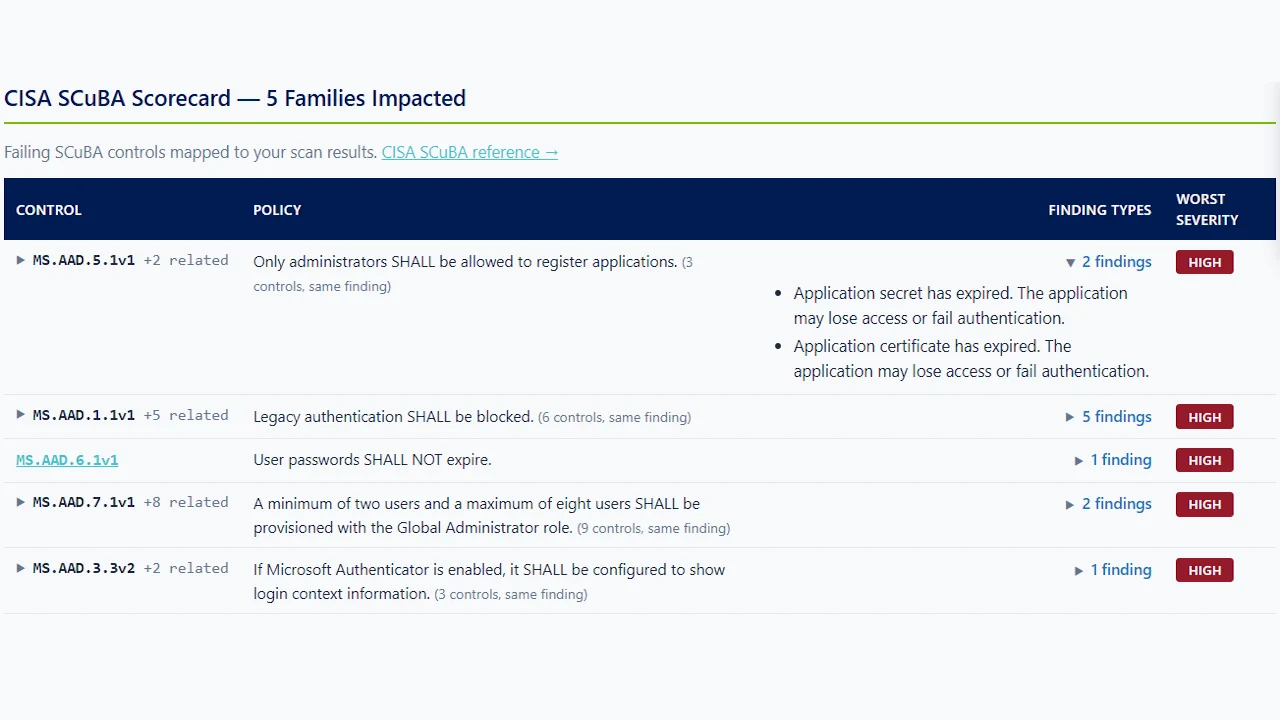
ScubaGear is CISA's open-source tool for checking Microsoft 365 against the SCuBA Secure Configuration Baselines. Senserva turns those checks into a ranked posture dashboard, compliance-mapped reports, and AI-generated, Senserva-validated remediation. Better together.
ScubaGear is a genuinely good thing for Microsoft 365 security. Built by CISA as part of the Secure Cloud Business Applications (SCuBA) project, it is a free, open-source PowerShell tool that assesses a tenant against published Secure Configuration Baselines for Entra ID, Exchange Online, SharePoint and OneDrive, Teams, Defender, and Power Platform. We respect it and we align to the same baselines. Where ScubaGear stops at a pass or fail report, Senserva keeps going: it ranks every finding, maps it to the compliance frameworks your auditor cares about, and generates remediation that Senserva validates before you apply it. You keep the CISA baseline and gain the dashboard, the reporting, and the fix.
Demo and Game Mode run free, no registration, no access to your tenant. Windows and Mac.
Download and go
Senserva runs standalone for full Microsoft 365 posture across configurations, logs, and CVEs, or right alongside ScubaGear.
ScubaGear checks your tenant against a published baseline and returns a pass or fail per policy. That is transparent and repeatable, and it is where most teams stop. Senserva takes the same posture further: it ranks the failures by Severity, maps each to the frameworks an auditor asks about, and hands you a validated fix, so a baseline diff becomes a worklist instead of a wall of red.
| What ScubaGear does well | Where teams want more |
|---|---|
| Free, open-source, and published by CISA, with transparent policy logic. | Output is a point-in-time pass or fail report, not a ranked, navigable posture dashboard. |
| Directly implements the SCuBA Secure Configuration Baselines for Microsoft 365. | Scope is the SCuBA configuration baselines, not the full breadth of Microsoft 365, Intune, Defender, Entra ID, CVEs, and Purview. |
| PowerShell-based and familiar to security-as-code teams, easy to run in a pipeline. | Remediation is left entirely to the operator to research and write. |
| A trusted, vendor-neutral reference point for Microsoft 365 baseline configuration. | No built-in AI reasoning, executive or client-ready reporting, or multi-tenant fleet view. |
| Capability | ScubaGear | Senserva |
|---|---|---|
| SCuBA baseline coverage for Microsoft 365 | Core purpose | Aligned, plus much more |
| Ranked posture dashboard | No | Yes |
| Checks beyond the SCuBA baselines | No | 650+ across the tenant |
| AI-generated, validated remediation | No | Yes |
| Compliance mapping and client-ready reports | Limited | Native |
| Multi-tenant for MSPs | Scriptable | Built in |
Comparison reflects general capabilities at time of writing and is provided for research. Vendor features change; verify current specifics with each vendor.
Senserva builds a complete, structured Microsoft 365 security dataset, configuration, identity, devices, logs, CVEs, and compliance mappings, as one connected graph, and opens all of it to the AI of your choice through the Claude MCP and the Senserva SDK. Bring your own model, there is no AI markup. Point Claude, or any AI you run, at the whole dataset and it can audit, threat-hunt, explain, and remediate from your real findings, not a vendor summary.
That is the part most tools do not give you. Many have no AI at all, or a closed built-in assistant you cannot point at your own model, or they keep their findings in a dashboard you cannot query. Where a tool does expose its data to your AI, Senserva runs right alongside it and adds the rest of the Microsoft 365 picture. Either way, the data stays with you, nothing is locked in a vendor cloud.
ScubaGear gave Microsoft 365 teams a trusted, vendor-neutral way to measure a tenant against a published standard. Because CISA maintains it and the policy logic is open, it carries credibility that a closed checklist cannot. It made the SCuBA baselines actionable and gave security-as-code teams a tool they could run in a pipeline. That is exactly why we align to the same baselines rather than reinvent them.
ScubaGear answers conformant or not. Senserva answers what to fix first. The same baseline results join your native scan in one ranked, navigable posture dashboard, with deep, automated, AI-enhanced reports an auditor or a client can actually read. The raw report becomes a prioritized plan.
The SCuBA baselines are a strong floor, not the whole building. Senserva adds identity and privileged-access depth in Entra ID, device and compliance posture in Intune, patch and CVE intelligence, and data protection in Purview, so the baseline is one chapter of a complete tenant assessment rather than the entire story.
The biggest gap a baseline tool leaves is the fix. Senserva closes it: for each finding it generates remediation with AI, tuned to your tenant's actual state, and Senserva validates it so you ship a reviewed step, not a guess. A red SCuBA result becomes a remediation you can approve, apply, and confirm on the next run.
No, and it does not need to. ScubaGear is an excellent free CISA tool for the SCuBA baselines. Senserva aligns to the same baselines, then ranks the findings, maps them to compliance frameworks, and adds AI-generated, Senserva-validated remediation, so you keep the CISA reference and get far more from it.
Yes. ScubaGear is open-source and published by CISA at no cost. Senserva is a commercial product that extends baseline results with a ranked dashboard, deep reporting, and validated remediation across the whole tenant.
SCuBA is CISA's Secure Cloud Business Applications project. Its Microsoft 365 Secure Configuration Baselines describe recommended settings across Entra ID, Exchange Online, SharePoint and OneDrive, Teams, Defender, and Power Platform. ScubaGear is the tool that checks a tenant against them.
Yes. Senserva runs 650+ deterministic checks across Microsoft 365, Intune, Defender, Entra ID (logs included), CVEs, and Purview, of which the SCuBA-aligned configuration is one part. You get baseline coverage plus identity, device, patch, and data-protection depth.
No agents and no cloud service. Senserva reads your tenant through Microsoft's APIs and runs on Windows or Mac. You can explore the whole product first on the free Advanced Microsoft 365 Security Simulator, with no access to your environment at all.
Yes. It supports multi-tenant and MSP fleets, with bulk tenant security audits and unified, client-ready reporting across many customers.
Senserva is built for AI from the ground up and also runs fully without it. Turn it on for AI-enhanced reports and to run the product from Claude, or the AI of your choice, via our market-leading MCP. You bring your own model, so there is no AI markup.
"Members of MISA, like Senserva, offer solutions that extend Microsoft security to quickly identify and remediate security incidents before they cause business impact."
Eric Burkholder, PM, Technology Partnerships, MicrosoftWe use Google Analytics cookies to understand site traffic. No findings, scan data, or tenant data are sent. Privacy policy.