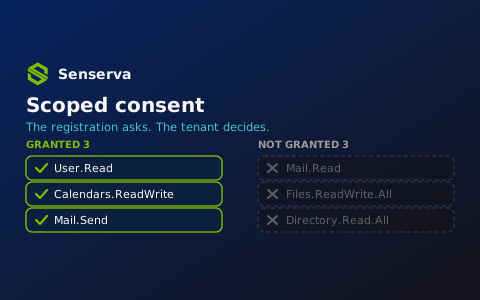
An app registration’s permission list is a request, not an entitlement. That distinction gets flattened in most rollout conversations, because the portal offers one green button labeled Grant admin consent for <tenant>, and the button has no checkboxes. Click it and every Delegated and Application permission on the registration becomes a live grant.
But the underlying model was never all-or-nothing. Scopes in the Microsoft identity platform are individually addressable strings, the grant that records them is a first-class directory object, and both the client and the consenting admin can operate on a subset. That’s scoped consent, also called partial permission consent: the app can ask for 12 permissions but you only give it 4 permissions.
This post covers why you’d deliberately grant less than what was requested, and how to do it with HTTP calls and PowerShell rather than the portal button.
Quick Recap: The 2 Key Properties
Two separate objects hold permissions, and conflating them is where most partial-consent confusion starts.
requiredResourceAccess on the application object is the registration’s declared wish list. It lives on the app registration, it’s authored by the developer, and it grants nothing. It’s the input to a consent prompt and to the .default scope.
oauth2PermissionGrant is the actual delegated entitlement. One object per client/resource/principal combination, holding a space-delimited scope string. ‘User.Read Mail.Read Calendars.Read’ in that string means those three scopes are live. Edit the string and you’ve changed what the app has access to, without touching the registration at all.
The registration is everything the vendor can ask for. The grant is what you decided they could have. Partial consent is the practice of keeping those two lists deliberately different.
Why you’d want to grant a subset
The vendor over-asked. This is the common case. A SaaS integration registers Mail.ReadWrite, Files.ReadWrite.All, and Directory.Read.All because their largest customer uses every feature, and their docs tell everyone to click the consent button. You use one feature, so instead of giving everything, you grant the scopes that feature needs.
Read now, write later. Staged rollout maps cleanly onto scope pairs. Grant Files.Read.All for the pilot, watch the audit logs for a sprint, upgrade to Files.ReadWrite.All when the failure modes are known. Downgrading a grant is a PATCH; unwinding a bad write is an incident.
Admin-restricted permissions shouldn’t block sign-in. Admin-restricted scopes like User.Read.All, Group.Read.All, or Directory.ReadWrite.All can’t be consented to by a standard organizational user. If the app requests them at first sign-in as part of one bundle, every non-admin user hits a page to prompt justification for the request or worse, an error page. Request User.Read at sign-in, let the app work, and route the privileged scope through an admin consent request when a user actually reaches the feature that needs it.
Consent prompts are a conversion funnel. A first-run prompt listing eleven permissions including mailbox write access gets abandoned. A prompt that says “Sign you in and read your profile” does not. Feature-gated consent, prompting for Calendars.ReadWrite at the moment the user clicks Enable calendar sync, converts better and gives the user an accurate mental model of why the app wants it.
Multi-tenant situations. An ISV’s registration has to be the union of what every customer needs. No individual customer should be forced to grant that whole set. If you’re an ISV, design partial grants into your workflow; if you’re the customer, don’t treat the vendor’s whole permission list as the only option.
Compliance constraints that have nothing to do with the app. Legal won’t allow mailbox content to leave the tenant. The DLP policy covers SharePoint but not Teams. These constraints land on specific scopes, and partial consent is the enforcement point that matches their granularity.
Incident response without a kill switch. When an app misbehaves, disabling the service principal takes down every feature and every user. Trimming one scope out of the grant string takes down one code path. That’s a materially different conversation with the business owner at 2am.
Decommissioning by measurement. Suspect a scope is unused? Remove it and watch for 403s. Partial consent is an easy option available for permission right-sizing, and it’s reversible in a single call.
Break-glass elevation. Some workflows need a write scope for a small window of time, say 1 hour every fiscal quarter. Granting it permanently because the annual job needs it is how tenants accumulate standing privilege.
Example: Asking for Less at the Authorize Endpoint
Dynamic consent is the client-side half. Rather than naming a resource generically, the app names the individual scopes it needs for the code path the user just triggered.
// Line breaks for legibility only.

GET https://login.microsoftonline.com/{tenant}/oauth2/v2.0/authorize
    ?client_id=00001111-aaaa-2222-bbbb-3333cccc4444
    &response_type=code
    &redirect_uri=https%3A%2F%2Fcontoso.com%2Fauth
    &response_mode=query
    &scope=openid%20profile%20offline_access%20https%3A%2F%2Fgraph.microsoft.com%2FUser.Read
    &state=12345
The user sees two lines on the consent page. The registration may declare 10 more permissions; none of them are prompted for and none of them are granted.
Example: Incremental Consent for a 2nd Feature
Let’s say the user from earlier has selected Enable calendar sync for your solution, the app asks for the new scope alongside what it already has. prompt=consent forces the prompt rather than silently returning the old token.
GET https://login.microsoftonline.com/{tenant}/oauth2/v2.0/authorize
    ?client_id=00001111-aaaa-2222-bbbb-3333cccc4444
    &response_type=code
    &redirect_uri=https%3A%2F%2Fcontoso.com%2Fauth
    &prompt=consent
    &scope=https%3A%2F%2Fgraph.microsoft.com%2FUser.Read%20https%3A%2F%2Fgraph.microsoft.com%2FCalendars.ReadWrite
    &state=12345
The token response tells you what you actually got, which is not necessarily what you asked for:
HTTP/1.1 200 OK
Content-Type: application/json

{
  "token_type": "Bearer",
  "scope": "User.Read Calendars.ReadWrite",
  "expires_in": 3599,
  "access_token": "eyJ0eXAiOiJKV1Qi...",
  "refresh_token": "OAQABAAAAAAD..."
}
Read scope on every response and the scp claim on every token. Under partial consent scenarios, an app that assumes its registered permissions are its effective permissions will fail at the API call instead of at the point where it could have asked. In C#, MSAL surfaces the same signal:
private static readonly string[] BaseScopes = { "User.Read" };
private static readonly string[] CalendarScopes = { "User.Read", "Calendars.ReadWrite" };

public async Task<AuthenticationResult> GetCalendarTokenAsync(IAccount account)
{
    try
    {
        return await _app.AcquireTokenSilent(CalendarScopes, account).ExecuteAsync();
    }
    catch (MsalUiRequiredException)
    {
        // Consent for Calendars.ReadWrite has not been granted for this user.
        return await _app.AcquireTokenInteractive(CalendarScopes)
                         .WithAccount(account)
                         .ExecuteAsync();
    }
}

public static bool HasScope(AuthenticationResult result, string scope) =>
    result.Scopes.Contains(scope, StringComparer.OrdinalIgnoreCase);
Gate the feature on HasScope, not on what the registration declares.
The .default trap
.default is the static-consent scope, and it’s where partial-consent loses relevance.
.default signals that consent should be prompted for all configured permissions listed on the app registration, across every API in the list. It also can’t be mixed with dynamic scopes: scope=https://graph.microsoft.com/.default Mail.Read is an error.
The nice part when requesting an authorization token is that .default only triggers a prompt if no delegated permission has been granted between that client and that resource for the signed-in user. Once your partial grant exists, a .default request returns a token containing exactly the granted scopes and no prompt appears. Partial consent survives, as long as nobody re-runs consent.
What breaks partial consent: prompt=consent with .default, the portal’s admin consent button, and the /adminconsent endpoint with .default. All three re-prompt for the full registered list, and an admin who clicks through restores everything you trimmed. That’s a change-control problem, not a technical one, and it’s the most common way a carefully scoped grant is lost.
For client credentials there’s no partial option at token time at all: client credentials requests must use scope={resource}/.default, and requesting individual application permissions is not supported. Every app role assigned to that service principal lands in the token. Partial consent for application permissions happens entirely at assignment time.
Example: Granting a Subset with PowerShell
The sure-fire path is to write the grant yourself. Connect with the permissions needed to manage grants:
Connect-MgGraph -Scopes @(
    'Application.Read.All',
    'DelegatedPermissionGrant.ReadWrite.All',
    'AppRoleAssignment.ReadWrite.All'
)

$graphAppId  = '00000003-0000-0000-c000-000000000000'  # Microsoft Graph
$clientAppId = '00001111-aaaa-2222-bbbb-3333cccc4444'  # the app being consented

$graphSp  = Get-MgServicePrincipal -Filter "appId eq '$graphAppId'"
$clientSp = Get-MgServicePrincipal -Filter "appId eq '$clientAppId'"

# Grant three scopes tenant-wide, regardless of what the registration is configured for.
$params = @{
    ClientId    = $clientSp.Id
    ConsentType = 'AllPrincipals'   # use 'Principal' + PrincipalId for a single user
    ResourceId  = $graphSp.Id
    Scope       = 'User.Read Calendars.Read Mail.Read'
}

New-MgOauth2PermissionGrant -BodyParameter $params
Trimming an existing grant is a property update on the same object. Note that this replaces the string, so read it first, remove what you’re revoking, write it back:
$grant = Get-MgOauth2PermissionGrant -All `
    -Filter "clientId eq '$($clientSp.Id)' and resourceId eq '$($graphSp.Id)'" |
    Where-Object { $_.ConsentType -eq 'AllPrincipals' }

$remaining = ($grant.Scope -split ' ' |
    Where-Object { $_ -and $_ -ne 'Mail.Read' }) -join ' '

Update-MgOauth2PermissionGrant -OAuth2PermissionGrantId $grant.Id -Scope $remaining
2 operational notes: Keep one grant object per client/resource/principal combination rather than creating a second one, since split grants are legal but make the effective permission set something you have to compute rather than read. And revocation isn’t instant: access tokens already issued remain valid until they expire, typically about an hour, so a revoked scope has a small window before fully effective. Make sure to double check though, long lived tokens issued under CAE enabled Apps could be active for a period of time up to 28 hours as well.
Application permissions are per-object, so partial means assigning only the roles you approve:
$approvedRoles = @('User.Read.All', 'GroupMember.Read.All')

foreach ($roleValue in $approvedRoles) {
    $role = $graphSp.AppRoles | Where-Object { $_.Value -eq $roleValue }
    if (-not $role) { Write-Warning "No app role named $roleValue"; continue }

    New-MgServicePrincipalAppRoleAssignment `
        -ServicePrincipalId $clientSp.Id `
        -PrincipalId        $clientSp.Id `
        -ResourceId         $graphSp.Id `
        -AppRoleId          $role.Id
}
Example: Auditing Requested versus Granted
The starter report is what apps have, but isn’t the interesting part of the story. It’s the delta between what they asked for and what they got, because that delta is a record of a decision, and a delta of zero across your whole tenant means nobody is making one.
$graphSp = Get-MgServicePrincipal -Filter "appId eq '00000003-0000-0000-c000-000000000000'"
$scopeLookup = @{}
foreach ($scope in $graphSp.Oauth2PermissionScopes) { $scopeLookup[$scope.Id] = $scope.Value }

Get-MgApplication -All | ForEach-Object {
    $app = $_

    $requested = $app.RequiredResourceAccess |
        Where-Object { $_.ResourceAppId -eq $graphSp.AppId } |
        ForEach-Object { $_.ResourceAccess } |
        Where-Object { $_.Type -eq 'Scope' } |
        ForEach-Object { $scopeLookup[$_.Id] }

    if (-not $requested) { return }

    $sp = Get-MgServicePrincipal -Filter "appId eq '$($app.AppId)'" -ErrorAction SilentlyContinue
    if (-not $sp) { return }

    $granted = Get-MgOauth2PermissionGrant -All `
        -Filter "clientId eq '$($sp.Id)' and resourceId eq '$($graphSp.Id)'" |
        ForEach-Object { $_.Scope -split ' ' } |
        Where-Object { $_ } |
        Sort-Object -Unique

    [pscustomobject]@{
        Application  = $app.DisplayName
        AppId        = $app.AppId
        Requested    = $requested.Count
        Granted      = $granted.Count
        NotGranted   = ($requested | Where-Object { $_ -notin $granted }) -join ', '
        GrantedExtra = ($granted   | Where-Object { $_ -notin $requested }) -join ', '
    }
} | Sort-Object Granted -Descending | Format-Table -AutoSize
GrantedExtra is the column worth reviewing: scopes that are live but no longer declared on the registration. That’s what a removed feature looks like a year later, because trimming requiredResourceAccess doesn’t touch the grant.
Three implementation notes: Always page through @odata.nextLink, since Graph paginates and a single-page sweep silently undercounts. Run the same delta against appRoleAssignment for application permissions, where the blast radius is larger because no user is in the loop. And check for per-user grants (consentType: Principal) separately; a tenant with user consent enabled accumulates hundreds of them and a tenant-wide report that only looks at AllPrincipals will miss them.
Worked Scenario
Fabrikam onboards a scheduling SaaS. The registration requests User.Read, Calendars.ReadWrite, Mail.Send, Mail.Read, Files.ReadWrite.All, and Directory.Read.All. The vendor’s onboarding doc says: sign in as Global Administrator, click Grant admin consent, done.
Instead, Fabrikam’s Admin reviews the feature set against the contract and sees that they only bought scheduling. They don’t use the vendor’s document attachment feature or its org-chart view. Files.ReadWrite.All and Directory.Read.All are out. Mail.Read is out too, since the vendor uses it to parse meeting requests out of inboxes, a feature Fabrikam disabled in the product settings.
The grant is written directly: User.Read Calendars.ReadWrite Mail.Send. Three of six. The app works, because the vendor’s client requests scopes dynamically and the two disabled features never ask for tokens.
Six months later the vendor ships an update that reads attachments during scheduling. Users see a feature that fails. Support escalates and our Admin sees the Files.Read.All request in the sign-in logs, and now there’s a decision to make, with a named feature attached to it, rather than a checkbox on an onboarding form. They grant Files.Read.All, not Files.ReadWrite.All, because reading is what the feature does.
Contrast the anti-pattern. Someone clicks the button during onboarding. All six scopes go live tenant-wide. The registration’s list becomes the tenant’s list. Two years on, nobody knows which of those six the product actually uses, the vendor has been acquired, and removing anything is a change nobody will sign off on because nobody can predict what breaks.
Case Study Example: Graph Explorer
You may be reading this article and saying to yourself, “Yeah, this might be cool, but when am I ever going to see it? And even if I do, when would it be useful to know the mechanics?”. Fair point, it gets deep into the weeds of how the permissions mechanics work. Someone could expect the App developer to use a standard least privilege approach for permissions requested.
However, I would argue that for those working in highly sensitive or regulated sectors, knowing these principles and how to work within their bounds keeps a controlled surface area and exposure risk for your organization. Is it not the core of Zero-Trust methodology to trust but also to verify?
Let’s look at a Dev Tool that I and many others use frequently: Microsoft Graph Explorer. If you approach any new feature using Graph, using Graph Explorer is a fantastic way to quickly test a new endpoint and figure out the quirks without a ton of setup.
When using Graph Explorer though, do you have to go and do a mega-consent for everything in Graph? Of course not, you have the gradual consent process i.e. partial permissions, giving the access you need for whatever you try to develop. Graph Explorer lives and breathes on the partial permission concept.
An interesting example came from work I was doing in conjunction with our good friends and longtime partners at Brave North Technology with their Cybersecurity and IT Director Simon Ronald.
We were looking at how to get data related to SharePoint. One of the endpoints we were reviewing was getting the FileStorageContainerType for the tenant. Going through, we found that while the endpoint itself is documented, the permission needed (FileStorageContainerType.Manage.All) isn’t exposed in the normal Graph Explorer interface.
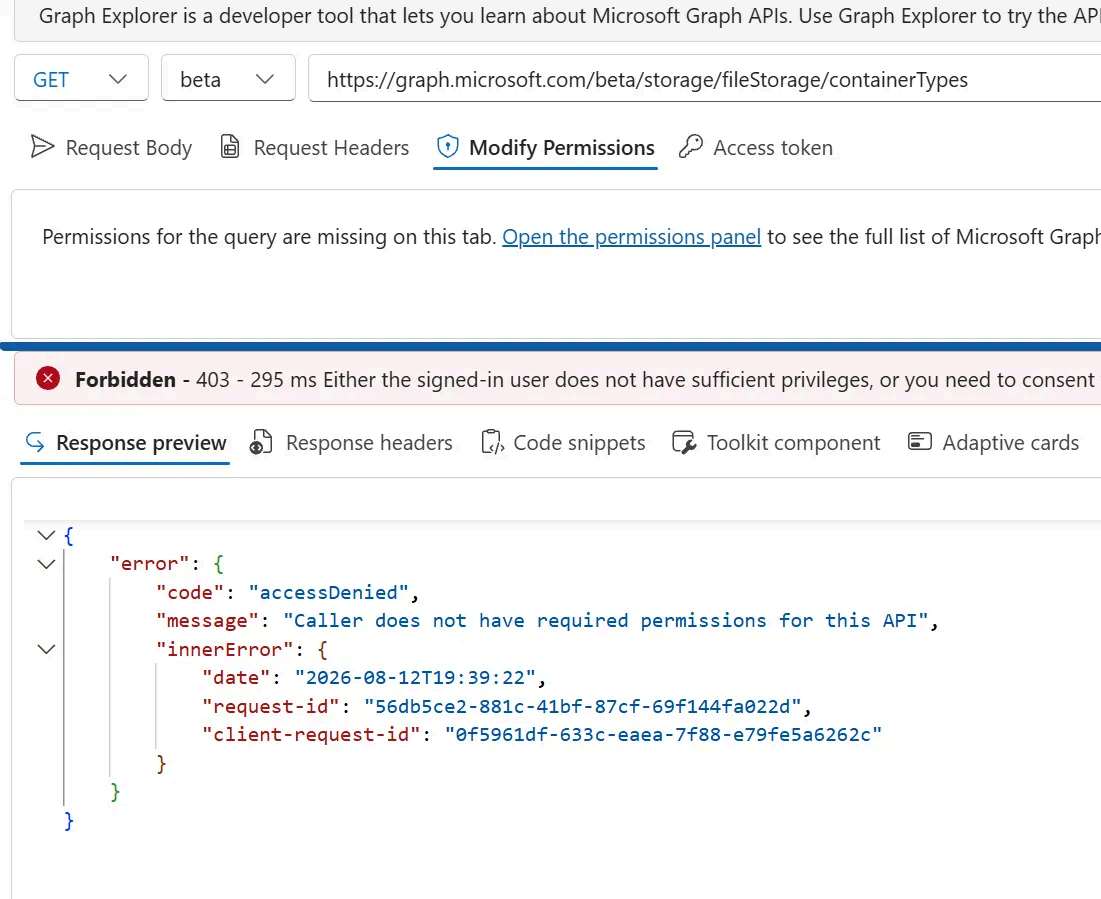
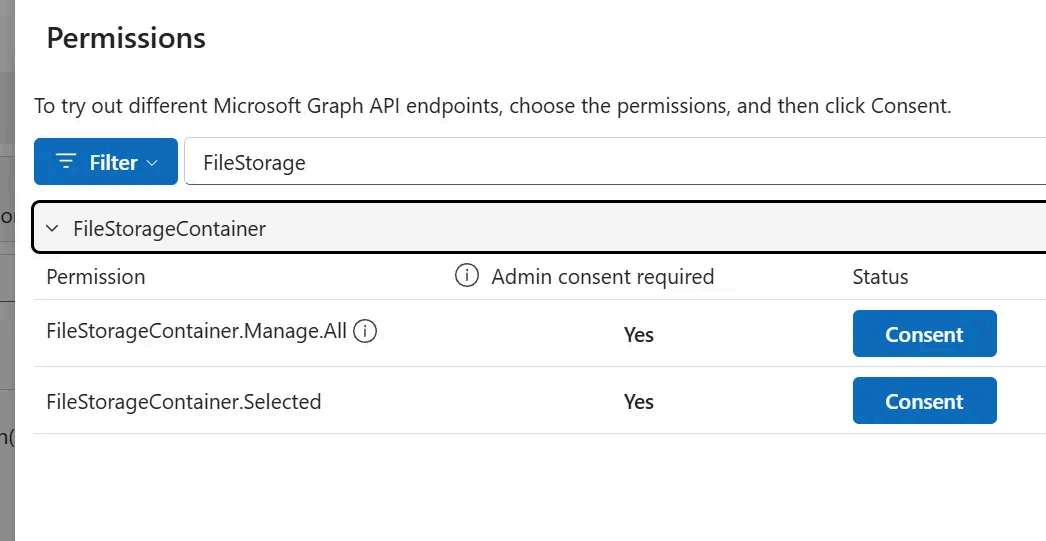
Do we let this minor roadblock stop us? Of course not. How to handle this without spinning up a quick app and coding it up yourself? You can build a partial permission consent URL. This URL has a few more parameters to account for PKCE constraints that the full Graph Explorer app would normally handle:
GET https://login.microsoftonline.com/{tenantId}/oauth2/v2.0/authorize
  ?client_id=de8bc8b5-d9f9-48b1-a8ad-b748da725064
  &response_type=code
  &redirect_uri=https%3A%2F%2Fdeveloper.microsoft.com%2Fen-us%2Fgraph%2Fgraph-explorer
  &response_mode=query
  &scope=openid%20profile%20offline_access%20FileStorageContainerType.Manage.All
  &prompt=consent
  &state=12345
  &code_challenge=AAAAAAAAAAAAAAAAAAAAAAAAAAAAAAAAAAAAAAAAAAA
  &code_challenge_method=S256

de8bc8b5-d9f9-48b1-a8ad-b748da725064  <- This is the Client ID for Graph Explorer
https%3A%2F%2Fdeveloper.microsoft.com%2Fen-us%2Fgraph%2Fgraph-explorer <- This is an escaped URL back to Graph Explorer
https%3A%2F%2Fgraph.microsoft.com%2FFileStorageContainerType.Manage.All <- This is an escaped URL for the FileStorageContainerType.Manage.All permission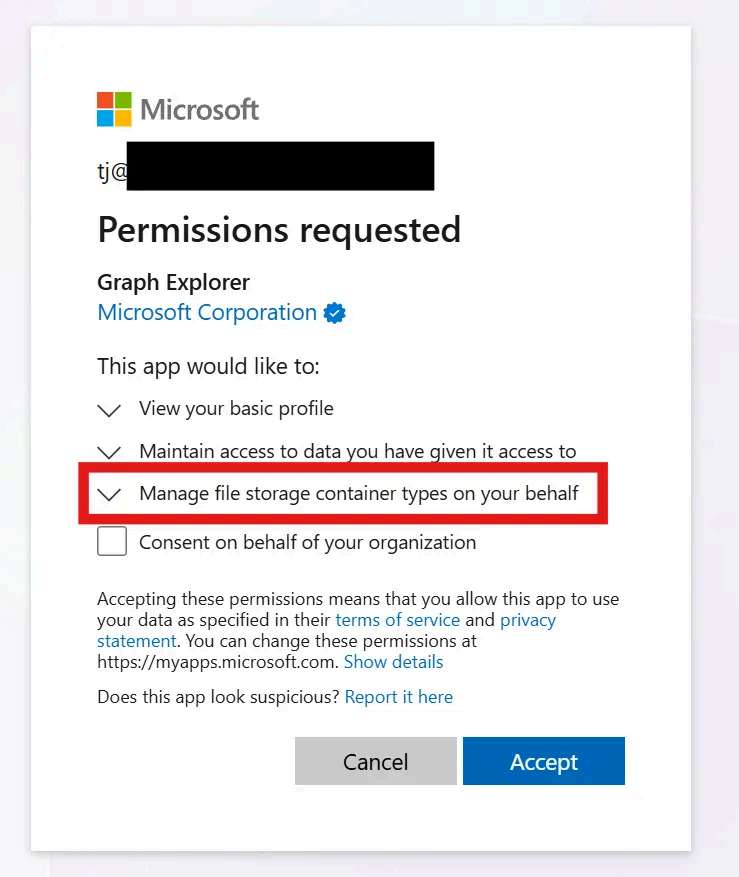
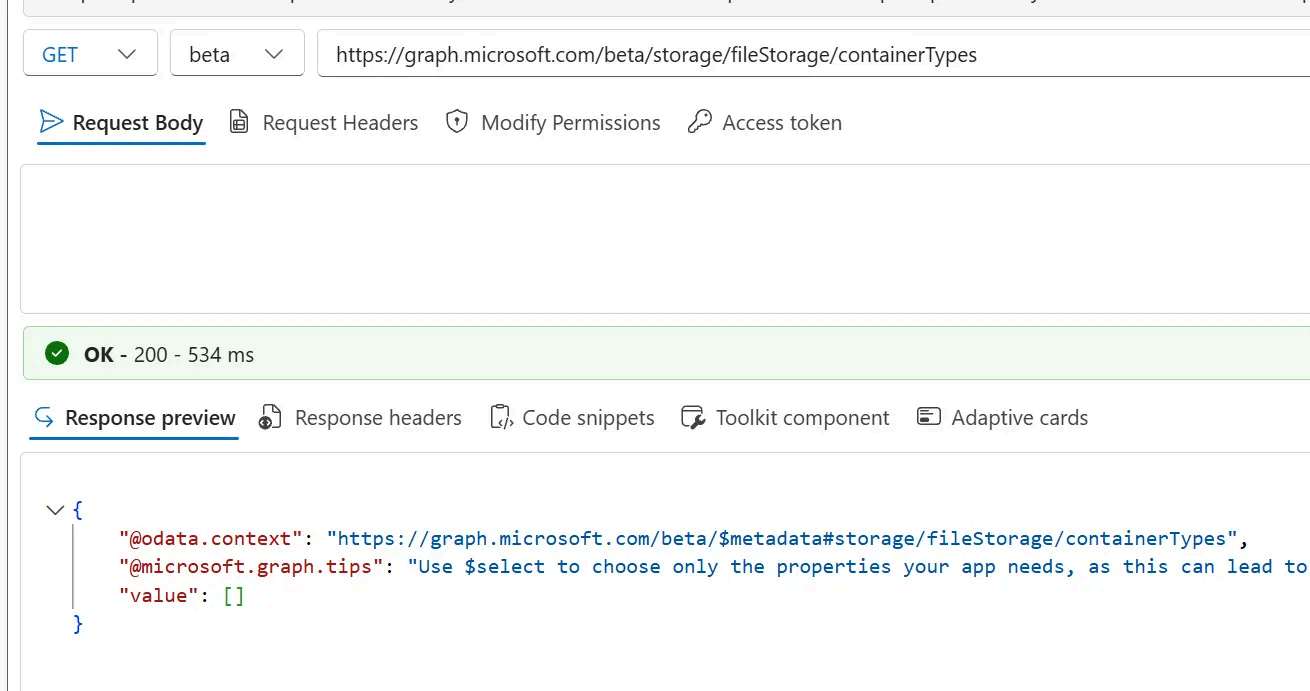
Once we’ve consented and refreshed our session (and more importantly the JWT Token) in Graph Explorer, we can now call the endpoint again, this time with success even if it does end up being an empty list.
The assessment angle
Scoped consent moves the decision from “do we trust this app” to “which of these capabilities did we buy,” and those are answerable at very different levels of confidence. The questions that follow from the mechanics:
Which apps have a granted scope set identical to their requested set, and was that a decision or a button click? Which grants contain scopes no longer present on the registration? Which apps use .default, so the next prompt=consent restores the full list? Who in the tenant can click Grant admin consent, and is that action reviewed like a permission change or treated as onboarding paperwork? How many per-user grants exist for apps that also have a tenant-wide grant? Which client-credentials apps carry app roles that no code path exercises?
The registration tells you what a developer wanted. The grant tells you what your tenant agreed to. If those two lists are identical across every app you’ve onboarded, the second list isn’t a decision, it’s an echo.