Agent 365 permissions flow down from the Agent Identity Blueprint. That part gets covered everywhere. What gets less attention is the layer that decides who is answerable for those permissions: the administrative relationships in Entra Agent ID. There are three of them, not two, and each exists to answer a different question.
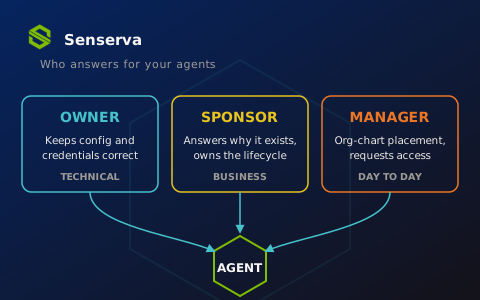
The Owner answers: who keeps this agent's configuration and credentials correct? The Sponsor answers: why does this agent exist, and is it still needed? The Manager answers: where does this agent sit in the org chart, and who requests access on its behalf day to day?
These roles look similar in the portal, but they have different capabilities, different assignment rules, different lifecycle behavior, and different failure modes when you skip them. This post breaks down the technical differences, with Graph API examples in C#.
Quick recap: The Object Chain
Every agent traces back through a parent chain: Agent Identity Blueprint (an application object subtype) creates Agent Identities (service principal subtypes), and an Agent Identity can parent an agent's user account, a user object subtype with a strict 1:1 relationship to its Agent Identity, for Microsoft 365 participation. OAuth permissions granted on the Blueprint Principal flow to every Agent Identity created from it, and inheritable permissions configured via the inheritablePermissions navigation property preauthorize scopes without per-agent consent.
That's the permission chain, determining what access is configured to the agents. Owners, Sponsors, and Managers are the accountability chain that runs alongside it. They're configured per object, separate from Entra RBAC roles like Agent ID Administrator, and each attaches to different objects in the chain, which is where most of the confusion starts.
The 3 Roles
Owners are technical administrators. They handle operational management: setup, configuration, and credential management. Owners can modify properties Sponsors can't touch, including authentication properties. An Agent ID Developer who creates a Blueprint is automatically assigned as its Owner and can perform write operations against it. Owners attach to Blueprints, Blueprint Principals, and Agent Identities.
Sponsors are business accountability. They own lifecycle decisions, access reviews, and retention, without technical administrative access. Sponsors can request access packages on behalf of the agents they Sponsor and participate in approval flows. Sponsors attach to every object in the chain: Blueprint, Blueprint Principal, Agent Identity, and the agent's user account. And the semantics differ by object, which we'll get to.
Managers are org-chart placement. A Manager is an individual user responsible for an agent within the organization's hierarchy, assignable on the agent's user account. Managers see agents designated as reporting to them in the Entra admin center and can request access packages for those reporting agents. They cannot modify or delete agents; that takes an Owner, Sponsor, or tenant administrator. Microsoft's guidance: for agents active in user scenarios, set a Manager on the agent's user account.
The assignment rules diverge in ways that matter for automation:
| Owner | Sponsor | Manager | |
|---|---|---|---|
| Required? | Optional | At least one per Blueprint and Agent Identity | Optional, recommended for user-scenario agents |
| Attaches to | Agent Blueprint, Agent Blueprint Principal, Agent Identity | All Agent object types | Agent User only |
| Users | Yes (including guests) | Yes | Yes (individual users only) |
| Groups | No | Yes, only dynamic or M365 groups | No |
| Service principals | Yes (enables automated management) | No | No |
| Modify config/credentials | Yes | No | No |
| Enable/disable the agent | Yes (My Account portal) | Yes (My Account portal) | No |
| Request access packages | Yes | Yes | Yes, for reporting agents |
| Auto-transfer on departure | No | Yes, to the Sponsor's Manager | Standard org-hierarchy updates |
Four nuances deserve expansion beyond the table.
Sponsor semantics change by object. A Sponsor on an Agent Identity, Blueprint, or Blueprint Principal has limited direct management ability alongside access-package requests. A Sponsor on the agent's user account behaves like a normal user Sponsor: no authority to change anything on the sponsored account, only the ability to request access on its behalf and sit in approval flows. Microsoft's recommendation is to set the same user or group as Sponsor on both the Agent Identity and the agent's user account so one accountable party can request access for both halves of the agent. If you only Sponsor one side, you've built a gap into your access request path.
Groups as Sponsors, with a caveat. Assigning a dynamic group as Sponsor is attractive for scale, but there's a documented lag: after a membership rule change or user property change, the authorization check on sponsorship can take up to 24 hours to succeed. If your automation assigns a dynamic group as Sponsor and immediately tests Sponsor-gated actions, expect intermittent failures that look like permission bugs.
Service principals as Owners. This is the automation hook. A pipeline identity can own a set of Blueprints and manage credentials programmatically without a human in the loop for routine rotation. It's also a privilege-concentration point worth flagging in an assessment: one compromised pipeline SP that owns twenty Blueprints is twenty compromised agent tenants.
Only Sponsors get a safety net. When a Sponsor leaves the organization, Sponsorship transfers to their Manager automatically, and Lifecycle Workflows ships two templates for Agent Identity Sponsor changes: notify Managers and cosponsors, and transfer sponsorship. Both are mover/leaver category tasks, so they fire when a Sponsor changes roles or exits, not on joiner events. Owners get nothing equivalent. An Owner leaves, and unless you've built the process yourself, the Blueprint just becomes technically unmanaged.
Example: Assigning a Sponsor at Creation
Sponsors must be bound when creating the Agent Identity itself. The Agent Identity is created as a microsoft.graph.agentIdentity service principal subtype, with Sponsors attached via sponsors@odata.bind:
using System.Net.Http.Json;
using System.Text.Json.Serialization;

public sealed record CreateAgentIdentityRequest(
    [property: JsonPropertyName("displayName")] string DisplayName,
    [property: JsonPropertyName("agentIdentityBlueprintId")] string BlueprintAppId,
    [property: JsonPropertyName("sponsors@odata.bind")] string[] SponsorBindings);

public sealed record CreatedIdentity([property: JsonPropertyName("id")] string Id);

public static async Task<string> CreateAgentIdentityAsync(
    HttpClient graphClient,
    string blueprintAppId,
    string sponsorUserId,
    CancellationToken ct)
{
    var request = new CreateAgentIdentityRequest(
        DisplayName: "Compliance Report Agent - Fabrikam",
        BlueprintAppId: blueprintAppId,
        SponsorBindings:
        [
            $"https://graph.microsoft.com/v1.0/users/{sponsorUserId}"
        ]);

    using var response = await graphClient.PostAsJsonAsync(
        "servicePrincipals/microsoft.graph.agentIdentity", request, ct);

    response.EnsureSuccessStatusCode();

    var created = await response.Content.ReadFromJsonAsync<CreatedIdentity>(ct)
        ?? throw new InvalidOperationException("Empty response creating Agent Identity.");

    return created.Id;
}
Sponsors are bound at creation time for Agent Identities, not as a follow-up step. The requirement is at least one Sponsor per Agent Identity, and a two-step create-then-assign flow gives you a window where a failure in step two leaves an unsponsored agent behind. Remember to repeat the Sponsor assignment on the agent's user account if one exists, per the same-Sponsor-on-both-objects guidance above.
Example: Adding an Owner to an Agent Blueprint
Blueprints are application objects, so Owner assignment uses the standard directory object reference pattern. Note what you can bind here: a user or a service principal, never a group. The portal flow for the same operation is documented in add and manage Owners and Sponsors.
public static async Task AddBlueprintOwnerAsync(
    HttpClient graphClient,
    string blueprintObjectId,
    string ownerDirectoryObjectId,
    CancellationToken ct)
{
    var body = new Dictionary<string, string>
    {
        ["@odata.id"] =
            $"https://graph.microsoft.com/v1.0/directoryObjects/{ownerDirectoryObjectId}"
    };

    using var response = await graphClient.PostAsJsonAsync(
        $"applications/{blueprintObjectId}/owners/$ref", body, ct);

    response.EnsureSuccessStatusCode();
}
One design decision to make deliberately: Owners can be assigned to the Blueprint, the Blueprint Principal, or individual Agent Identities. Microsoft's guidance leans toward assigning at the Blueprint level, since all Agent Identities inherit their configuration from it and one assignment covers the environment. Per-identity Owner assignment is supported in the portal, but it fragments your management surface across every instance.
Example: Assigning a Manager to an Agent User account
The agent's user account is a user object, so Manager assignment uses the standard user Manager reference, a PUT against the singleton Manager navigation:
public static async Task AssignAgentManagerAsync(
    HttpClient graphClient,
    string agentUserAccountId,
    string managerUserId,
    CancellationToken ct)
{
    var body = new Dictionary<string, string>
    {
        ["@odata.id"] =
            $"https://graph.microsoft.com/v1.0/users/{managerUserId}"
    };

    using var request = new HttpRequestMessage(
        HttpMethod.Put,
        $"users/{agentUserAccountId}/manager/$ref")
    {
        Content = JsonContent.Create(body)
    };

    using var response = await graphClient.SendAsync(request, ct);
    response.EnsureSuccessStatusCode();
}
Two things this buys you. The agent now appears under that Manager's reports in the Entra admin center, so a team lead can see at a glance which agents work for them. And the Manager can request access packages for the agent through normal channels without needing Owner or Sponsor rights, which keeps day-to-day access requests out of your technical admins' queue.
Example: Auditing for Ungoverned Agents
This is where the roles stop being an org-chart formality and become a security finding. An agent with no Owner has no one keeping its credentials and configuration correct. An agent with no Sponsor has no one who can answer whether it should exist. Microsoft MVP security guidance calls Ownerless agents a silent risk, and classic service-principal-based agents created before Agent ID won't have any of these relationships at all.
public sealed record DirectoryRef([property: JsonPropertyName("id")] string Id);

public sealed record AgentIdentitySummary(
    [property: JsonPropertyName("id")] string Id,
    [property: JsonPropertyName("displayName")] string DisplayName,
    [property: JsonPropertyName("owners")] DirectoryRef[]? Owners,
    [property: JsonPropertyName("sponsors")] DirectoryRef[]? Sponsors)
{
    public bool IsOwnerless => Owners is null or { Length: 0 };
    public bool IsSponsorless => Sponsors is null or { Length: 0 };
}

public sealed record AgentIdentityPage(
    [property: JsonPropertyName("value")] AgentIdentitySummary[] Value,
    [property: JsonPropertyName("@odata.nextLink")] string? NextLink);

public static async Task<List<AgentIdentitySummary>> FindUngovernedAgentsAsync(
    HttpClient graphClient, CancellationToken ct)
{
    var ungoverned = new List<AgentIdentitySummary>();

    var url = "servicePrincipals/microsoft.graph.agentIdentity" +
              "?$select=id,displayName&$expand=owners($select=id),sponsors($select=id)";

    while (url is not null)
    {
        var page = await graphClient.GetFromJsonAsync<AgentIdentityPage>(url, ct)
            ?? throw new InvalidOperationException("Empty page listing Agent Identities.");

        ungoverned.AddRange(page.Value.Where(a => a.IsOwnerless || a.IsSponsorless));

        url = page.NextLink;
    }

    return ungoverned;
}
Three implementation notes. First, always walk @odata.nextLink: agent tenants grow fast and a single-page query silently undercounts. Second, run this against both Agent Identities and Blueprints; a fully sponsored Agent Identity under an Ownerless Blueprint still has an unmanaged credential surface above it. Third, extend the sweep to agents' user accounts and check both the Sponsor and Manager relationships there, since a user-scenario agent with no Manager has no one fielding its routine access requests. The tenant-wide management surface these queries mirror is documented in manage Agent Identities in your organization.
Worked scenario: 1 Blueprint, 5 Agents, 3 Roles
Say Fabrikam deploys a "Compliance Report Agent" Blueprint, then stamps five Agent Identities from it, one per business unit, each with an agent's user account so it can send report emails and post in Teams.
The clean setup assigns all three roles deliberately. The platform engineering pipeline's service principal owns the Blueprint, so credential rotation and config changes are automated and audited, with a human platform lead as second Owner for break-glass. Each Agent Identity and its paired user account get the same Sponsor from the business unit it serves: the person who can say whether that unit still needs the agent. Each agent's user account gets the BU team lead as Manager, so the agents show up in that lead's reports and routine access-package requests flow through them instead of the platform team.
Now the lifecycle events. The northeast BU's Sponsor changes roles: a Lifecycle Workflow notifies the Manager and cosponsors and transfers sponsorship, so the agent never orphans. The team lead wants the agent added to a new reporting workspace: as Manager, they request the access package themselves. The platform lead leaves the company: nothing automatic happens, because Owners have no transfer mechanism, and this is exactly the check your quarterly review needs to catch.
Contrast the common anti-pattern: the developer who ran the setup CLI is the sole Owner of everything (automatic, remember), Sponsors were skipped or set to that same developer, Managers were never assigned, and eight months later that developer is on a different team. Every one of those agents is now a finding. Owners and Sponsors can see and act on their agents through the My Account portal, but only if they know they hold the role.
The assessment angle
The 3-role model gives you clean separation: technical control with Owners, business accountability with Sponsors, day-to-day access stewardship with Managers, and an automatic safety net on the Sponsor side only. The questions to bake into your recurring posture checks follow directly from the mechanics:
- Which Blueprints have no Owner, or only a departed developer as Owner?
- Which Agent Identities are missing the required Sponsor, or carry a different Sponsor than their paired user account?
- Which Sponsors are dynamic groups whose membership rules no longer match anyone?
- Which user-scenario agents have no Manager, so their access requests dead-end?
- Which service principals own multiple Blueprints, and what's the blast radius if one is compromised?
- Which classic service principal agents predate Agent ID and sit outside this model entirely?
Permissions tell you what an agent can do. Owners, Sponsors, and Managers tell you who answers for it, at three different altitudes. Audit all three, because an agent with strong permissions and no accountable human is exactly the drift pattern this model was built to prevent.